
Back

-
Solutions
Back
Digital Trust for:
Enterprise IT, PKI & Identity
Code & Software
Documents & Signing
IoT & Connected Devices
Manage PKI and Certificate risk in one place
Streamlined Certificate
Management
and Automation:
Delivering At-Scale Uptime
and Availability
Secure, update, monitor and control connected devices at scale
DOWNLOAD NOW - Buy
-
Insights
Back
Digital Trust for the Real World
Explore these pages to discover how DigiCert is helping organizations establish, manage and extend digital trust to solve real-world problems.
Ponemon Institute Report
See what our global post-quantum study uncovered about where the world stands in the race to prepare for quantum computing.
LEARN MORE >

-
Partners
Back
- Support
- Contact us
- Language


What is an SSL Certificate?
Learn about Secure Sockets Layer (SSL) protocol, how SSL certificates work, and why they are essential for Internet security.
What is an SSL Certificate and How Does it Work?
SSL certificates create an encrypted connection and establish trust.
One of the most important components of online business is creating a trusted environment where potential customers feel confident in making purchases. SSL certificates create a foundation of trust by establishing a secure connection. To assure visitors their connection is secure, browsers provide special visual cues that we call EV indicators—anything from a green padlock to branded URL bar.

SSL certificates have a key pair: a public and a private key. These keys work together to establish an encrypted connection. The certificate also contains what is called the “subject,” which is the identity of the certificate/website owner.

To get a certificate, you must create a Certificate Signing Request (CSR) on your server. This process creates a private key and public key on your server. The CSR data file that you send to the SSL Certificate issuer (called a Certificate Authority or CA) contains the public key. The CA uses the CSR data file to create a data structure to match your private key without compromising the key itself. The CA never sees the private key.
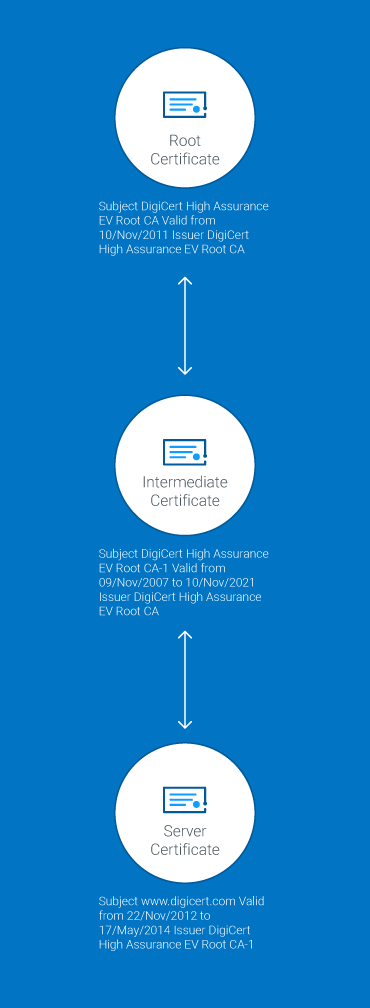
Once you receive the SSL certificate, you install it on your server. You also install an intermediate certificate that establishes the credibility of your SSL certificate by tying it to your CA’s root certificate. The instructions for installing and testing your certificate will be different depending on your server.
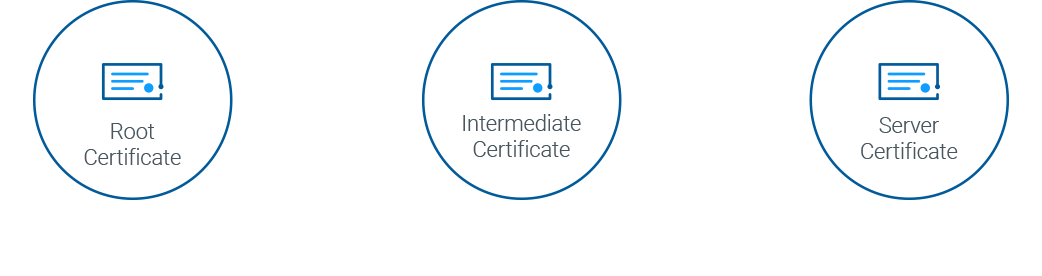
In the image below, you can see what is called the certificate chain. It connects your server certificate to the CA’s root certificate (in this case DigiCert) through an intermediate certificate.
The most important part of an SSL certificate is that it is digitally signed by a trusted CA, like DigiCert. Anyone can create a certificate, but browsers only trust certificates that come from an organization on their list of trusted CAs. Browsers come with a pre-installed list of trusted CAs, known as the Trusted Root CA store. In order to be added to the Trusted Root CA store and thus become a Certificate Authority, a company must comply with and be audited against security and authentication standards established by the browsers.
An SSL certificate issued by a CA to an organization and its domain/website verifies that a trusted third party has authenticated that organization’s identity. Since the browser trusts the CA, the browser now trusts that organization’s identity too. The browser lets the user know that the website is secure, and the user can feel safe browsing the site and even entering their confidential information.
What is Secure Sockets Layer (SSL)?
Secure Sockets Layer (SSL) is a standard security technology for establishing an encrypted link between a server and a client—typically a web server (website) and a browser, or a mail server and a mail client (e.g., Outlook). It is more widely known than TLS, or Transport Layer Security, the successor technology of SSL.
SSL allows sensitive information such as credit card numbers, social security numbers, and login credentials to be transmitted securely. Normally, data sent between browsers and web servers is sent in plain text—leaving you vulnerable to eavesdropping. If an attacker is able to intercept all data being sent between a browser and a web server, they can see and use that information.
More specifically, SSL is a security protocol. Protocols describe how algorithms should be used. In this case, the SSL protocol determines variables of the encryption for both the link and the data being transmitted.

All browsers have the capability to interact with secured web servers using the SSL protocol. However, the browser and the server need what is called an SSL Certificate to be able to establish a secure connection.
SSL secures millions of peoples’ data on the Internet every day, especially during online transactions or when transmitting confidential information. Internet users have come to associate their online security with the lock icon that comes with an SSL-secured website, or green address bar that comes with an Extended Validation SSL-secured website. SSL-secured websites also begin with “https” rather than “http.”
Already understand the basics of SSL certificates and technology? Learn about SSL cryptography.
How Does the SSL Certificate Create a Secure Connection?
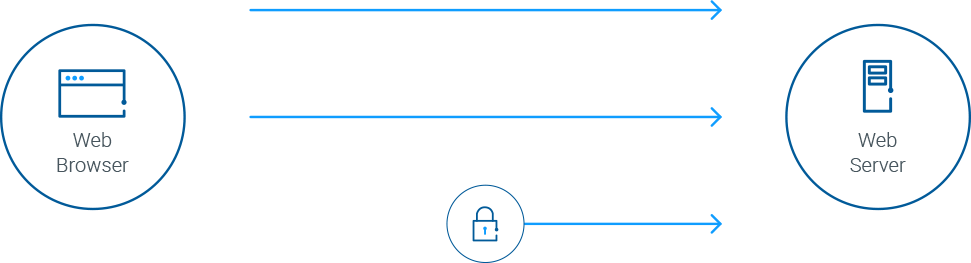
When a browser attempts to access a website that is secured by SSL, the browser and the web server establish an SSL connection using a process called an “SSL Handshake” (see diagram below). Note that the SSL Handshake is invisible to the user and happens instantaneously.
Essentially, three keys are used to set up the SSL connection: the public, private, and session keys. Anything encrypted with the public key can only be decrypted with the private key, and vice versa.
Because encrypting and decrypting with private and public key takes a lot of processing power, they are only used during the SSL Handshake to create a symmetric session key. After the secure connection is made, the session key is used to encrypt all transmitted data.
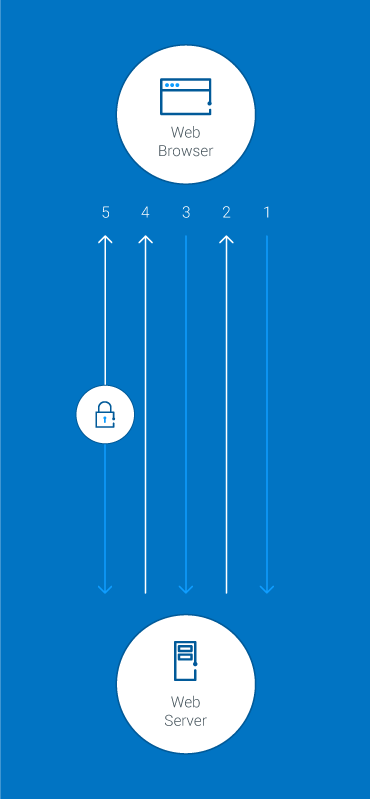
- Browser connects to a web server (website) secured with SSL (https). Browser requests that the server identify itself.
- Server sends a copy of its SSL Certificate, including the server’s public key.
- Browser checks the certificate root against a list of trusted CAs and that the certificate is unexpired, unrevoked, and that its common name is valid for the website that it is connecting to. If the browser trusts the certificate, it creates, encrypts, and sends back a symmetric session key using the server’s public key.
- Server decrypts the symmetric session key using its private key and sends back an acknowledgement encrypted with the session key to start the encrypted session.
- Server and Browser now encrypt all transmitted data with the session key.

Is my certificate SSL or TLS?
The SSL protocol has always been used to encrypt and secure transmitted data. Each time a new and more secure version was released, only the version number was altered to reflect the change (e.g., SSLv2.0). However, when the time came to update from SSLv3.0, instead of calling the new version SSLv4.0, it was renamed TLSv1.0. We are currently on TLSv1.3.
Because SSL is still the better known, more commonly used term, DigiCert uses TLS/SSL when referring to certificates or describing how transmitted data is secured. When you purchase an SSL Certificate from us (e.g., Standard SSL, Extended Validation SSL, etc.), you are actually getting a TLS Certificate (RSA or ECC).
Compare TLS/SSL Certificate Uses
Uses
Informational sites & blogs
Websites that don't collect payments or sensitive information need HTTPS to keep user activity private-even blogs.
Login panels & forms
TLS/SSL encrypts and protects usernames and passwords, as well as forms used to submit personal information, documents or images.
Checkout pages
Customers are more likely to complete a purchase if they know your checkout area (and the credit card info they share) is secure.
Recommended TLS/SSL Certificate type
OV (Organization Validated) TLS/SSL certificates - The second highest level of authenticity and next most rigorous organiztion checks.
OV (Organization Validated) TLS/SSL certificates - The second highest level of authenticity and most-rigorous organization checks.
EV (Extended Validation) TLS/SSL Certificates - The highest level of authenticity and most-rigorous identity checks.
DigiCert Products
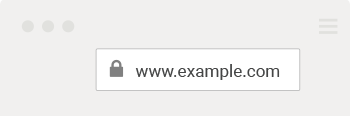
LOOK BEYOND THE LOCK
Just seeing a padlock in the address bar is no longer enough
By clicking on the padlock icon in the URL bar you can verify the identity of the website owner. Unfortunately, most phishing sites today have a padlock and a DV certificate. That's why it's important to look beyond the lock in the URL bar. If a website is not willing to put their identity in the certificate, you shouldn't be willing to share any identifying information with them. If you see the organization's name, now you can make a better decision about who you trust.
Eliminate Manual Management
Get the DigiCert TLS Best Practices Guide to see how you can put an end to resource-intensive and risky manual certificate management.
-

The most-trusted global provider of high-assurance TLS/SSL, PKI, IoT and signing solutions.
-


-
© 2024 DigiCert, Inc. All rights reserved.
Legal Repository Audits & Certifications Terms of Use Privacy Center Accessibility Cookie Settings