Back

-
Solutions
Back
Digital Trust for:
Enterprise IT, PKI & Identity
Code & Software
Documents & Signing
IoT & Connected Devices
Manage PKI and Certificate risk in one place
Streamlined Certificate
Management and Automation:
Delivering At-Scale Uptime and Availability
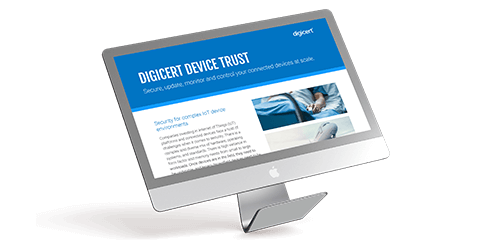
Secure, update, monitor and control connected devices at scale
DOWNLOAD NOW - Buy
-
Insights
Back
Digital Trust for the Real World
Explore these pages to discover how DigiCert is helping organizations establish, manage and extend digital trust to solve real-world problems.
Ponemon Institute Report
See what our global post-quantum study uncovered about where the world stands in the race to prepare for quantum computing.
LEARN MORE >

-
Partners
Back
- Support
- Contact us
- Language



DigiCert Basic TLS/SSL certificates
Protect your growing business, blog or informational website with the world’s most trusted TLS/SSL certificates.
DigiCert Basic TLS/SSL Certificates
If your website doesn’t collect payments or personal information, a DigiCert® Basic TLS certificate subscription will give you the encryption you need without the bells and whistles you don’t.
This essential certificate subscription allows you to enable HTTPS and establish trust with visitors, providing flexible encryption backed by the industry's highest-rated support.
Read More >- 24x5 Standard Support
- $1.25 million NetSure warranty
- DigiCert CertCentral certificate management platform
DigiCert Basic TLS/SSL Certificates
If your website doesn’t collect payments or personal information, a DigiCert® Basic TLS certificate subscription will give you the encryption you need without the bells and whistles you don’t.
This essential certificate subscription allows you to enable HTTPS and establish trust with visitors, providing flexible encryption backed by the industry's highest-rated support.
Read More >- 24x5 Standard Support
- Supports Extended Validation (EV)
- $1.25 million NetSure warranty
- DigiCert CertCentral certificate management platform
Configure your Basic TLS product
Basic TLS/SSL Certificates
Features
DigiCert Basic TLS certificates offer the highest level of globally trusted encryption for your business, blog or personal site. Basic certificates are intended for people and organizations who need to keep user activity private and secure but may not require additional management tools and features.
Customizable certificate lifespans
Easily set customized certificate lifespans to meet your organizational or regional standards.
Industry-leading support & validation
DigiCert Basic TLS/SSL certificate owners have standard, 24x5 access to our 5-star support and validation. If you require more dedicated support, you may consider upgrading to a Secure Site or Secure Site Pro certificate.
Compatibility with all major browsers
DigiCert TLS/SSL certificates are recognized by all major browsers and trusted across the globe, boosting user trust and ensuring your site is secure no matter how it’s accessed.
Unlimited transfers and replacements
Should you need to replace your certificate due to compliance changes or transfer to a different account, you can do so free of charge without limitations.
Continuous protection
Prevent costly lapses, improve budget forecasting and align with certificate lifecycle automation goals. Your DigiCert Basic TLS/SSL subscription allows you to automatically renew your certificates before they expire.
Supports Extended Validation
Give your website the highest level of identity validation by upgrading to an EV certificate, either at purchase or during your next renewal.
Specifications
- X.509 format Certificate meets software & industry standards
- Symmetric 256-bit encryption
- Unlimited server licensing
- Support 2048-bit public key encryption
- Free reissues and replacement for the lifetime of the certificate
Use Cases
- Personal websites that do not collect Personally Identifiable Information (PII)
- Informational (non-eCommerce) business websites
- Blogs
- Organizations with a single domain to secure and manage
- Organizations that do not require malware scanning or trust log monitoring
- Individuals or organizations with a minimal need for intensive technical support

Here's what customers are saying
“It is fantastic to be able to talk to real humans who can help me step through the process of creating certificates with a screenshare! Thanks very much!”
Our obsession with customer success
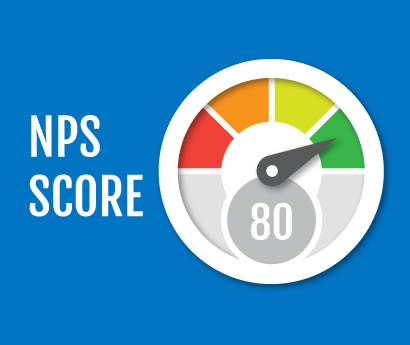
One of DigiCert’s core values is “customer obsession”—a dedication reflected in the Net Promoter Score (NPS) given to us by verified customers. The scale goes from -100 to 100, with a score of 50 universally regarded as “exceptional.”
Here's what customers are saying
“This technician was absolutely incredible! I have been doing IT support for 38 years and you don't run into techs that are this spot on accurate and friendly to boot. Give this guy a raise!!!”
- Review 1
- Review 2
- Review 3
Frequently Asked Questions
Transport Layer Security (TLS) is the successor to the Secure Socket Layer (SSL) protocol. All of our certificates use TLS, but because the old term is still more commonly used so we include it for clarity.
LEARN MORE >
Domain Validation (DV), Organization Validation (OV) and Extended Validation (EV) refer to different levels of identity validation that are performed by the issuing Certificate Authority (CA) before the certificate is issued to prevent bad actors from impersonating another organization. DV is the lowest level, while EV is the highest. DigiCert does not offer DV certificates.
LEARN MORE >
Validation is the process of confirming your organization’s identity before we can issue a certificate for your domain. Depending on the level of validation required for your certificate, the timing can vary—but once you’ve given us all the necessary documentation, we can usually issue your certificate in less than an hour. If you need accelerated validation, consider upgrading to Secure Site or Secure Site pro.
LEARN MORE >
TLS/SSL certificates are valid for 397 days—roughly 13 months—and must be renewed before this period ends to avoid a certificate outage. With a DigiCert subscription plan, we’ll notify you when it’s time to renew and automatically reissue a valid certificate.
DigCert certificate subscriptions allow you the flexibility to easily replace or reconfigure certificates and other licensed products, simplify budgeting by annualizing the fees associated with your certificates, and automate license renewals for streamlined certificate lifecycle management.
Related Resources
LEARN HOW DIGICERT SOLUTIONS
CAN HELP YOU DELIVER DIGITAL TRUST
-

The most-trusted global provider of high-assurance TLS/SSL, PKI, IoT and signing solutions.
-


-
© 2024 DigiCert, Inc. All rights reserved.
Legal Repository Audits & Certifications Terms of Use Privacy Center Accessibility Cookie Settings