Exchange 2010: Multi-Domain Certificates SANs
What Subject Alternate Names (SANs) Should I Include in an Exchange 2010 Certificate?
Internal Names Note: You can no longer include internal names/reserved IP address in your certificates. All publicly trusted SSL Certificates issued to internal names and reserved IP addresses will expire before November 1, 2015. See SSL Certificates for Internal Server Names.
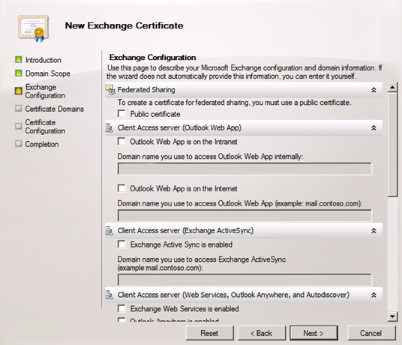
In Exchange 2010, finding the SANs that need to be included in your Multi-Domain (SAN) Certificate has been simplified. You can use the Microsoft Exchange Certificate Wizard to generate a list of SANs that should be included in your Multi-Domain Certificate.
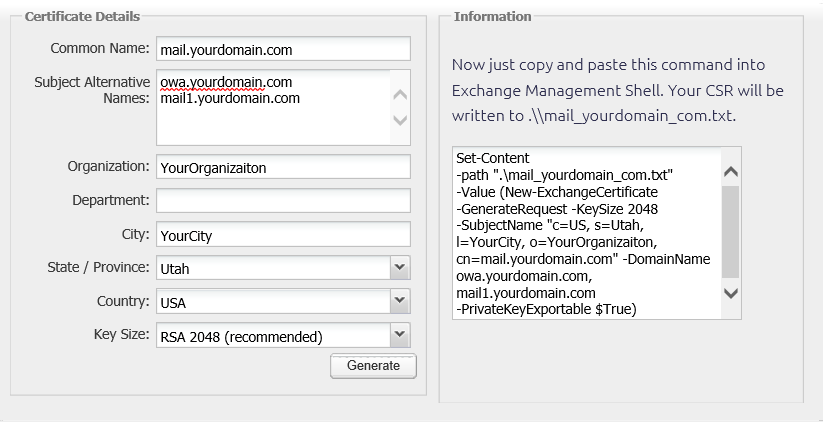
If you already know which SANs you need to include your Multi-Domain Certificate, you can use the DigiCert® Exchange 2010 CSR Wizard to generate the CSR for your Multi-Domain Certificate.
Tips
Whether you use the Exchange Certificate Wizard or DigiCert Exchange CSR Wizard to create your CSR, we have compiled a list of tips for you to keep in mind:
-
Include only the external fully qualified domain names of your Exchange CAS server(s), (e.g., owa.domain.com)
-
If you are using autodiscover, make sure to include an entry for autodiscover. Note that the autodiscover service uses autodiscover.domain.com by default.
-
If you use the same URL for OWA, ActiveSync, Outlook Anywhere, or any other service on the Exchange 2010 server and only have one CAS server, you do not need to take any extra steps.
However, if this is not the case, review the following:
-
If you are using different URLs, make sure to include entries for those as well.
-
If you are using more than one CAS server, make sure to include the fully qualified domain name of every CAS server that is involved.
-
Using the Microsoft Exchange Certificate Wizard
Launch the the wizard. On the Exchange Configuration page, check the services/roles that are applicable to your environment. Your server will then suggest a list of SANs to use in your certificate. Note that we recommend you confirm that the information is accurate and make sure not to include any internal names.
Using the DigiCert Exchange 2010 CSR Wizard
You can still use the DigiCert® Exchange 2010 CSR Wizard to create your CSR if you know the list of SANs that you need to include. Make sure not to include any internal names.