Articles
Automated TLS certificate management for a single IIS website
Automate certificate lifecycles for a fully encrypted IIS website while preserving your existing Windows Server architecture.
{{anchor:Introduction}}
A DigiCert Agent installed on the IIS server enables centralized certificate lifecycle management through DigiCert Trust Lifecycle Manager (TLM). In this scenario, end users connect to a single IIS website over HTTPS through the corporate firewall, while the website remains fully TLS-encrypted. The DigiCert Agent performs supported certificate automation locally on the Windows server and communicates with DigiCert services via outbound HTTPS connectivity, so no inbound firewall rules are required.
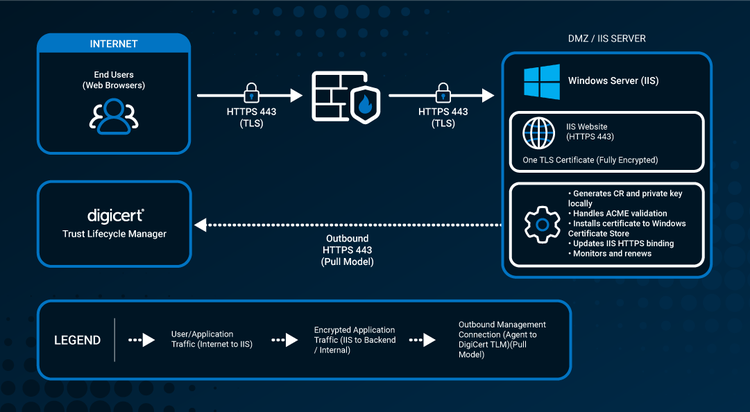
User HTTPS traffic and certificate-management traffic are separate. End users initiate HTTPS 443 connections to IIS. The DigiCert Agent initiates outbound HTTPS 443 management connectivity to Trust Lifecycle Manager.
{{anchor:Why it matters}}
Why this scenario matters
A single IIS website may seem simple, but its TLS certificate remains operationally critical. If the certificate expires or the IIS HTTPS binding points to the wrong certificate, users may see browser warnings or lose access to the application entirely. As public TLS certificate lifetimes continue to shorten, manual renewal, import, and binding processes become harder to manage reliably.
The goal is not to replace Microsoft IIS or the Windows Certificate Store. It is to automate certificate lifecycle management around the existing Windows and IIS architecture while keeping the live website encrypted over HTTPS.
{{anchor:How DigiCert fits}}
How DigiCert fits
- Centralized lifecycle management — use TLM to centralize certificate inventory, policy, automation status, and lifecycle monitoring.
- Agent-based IIS automation — install a DigiCert Agent on the Windows server to manage supported IIS certificate deployment and renewal operations.
- Outbound management connectivity — the Agent uses a pull communication model over outbound HTTPS (TCP 443). No inbound TLM-to-Agent management connection is required.
- Domain validation flexibility — DNS integrations can automate DNS-based DCV. HTTP-based validation can also be used where the IIS and network configuration support it.
{{anchor:At a glance}}
At a glance
- Environment: one supported Windows Server running Microsoft IIS, one website, one hostname, and one TLS certificate.
- User traffic: end users → HTTPS 443 → corporate firewall → HTTPS 443 → IIS website.
- DigiCert deployment model: Trust Lifecycle Manager with a DigiCert Agent installed on the IIS server.
- Typical validation approach: DNS-based validation is often a strong fit because it avoids opening inbound HTTP solely for validation. HTTP-based validation remains available when the environment supports it.
- What to verify before deployment: supported Windows/IIS versions, Agent prerequisites and outbound destinations, certificate profile, DCV method, DNS integration if used, and the IIS binding configuration.
{{anchor:Technical implementation details}}
Technical implementation details
DigiCert supports Agent-based managed automation for Microsoft IIS on supported Windows systems. Supported systems include Microsoft IIS 7, 7.5, 8.0, 8.5, and 10 on supported Windows platforms. DigiCert strives to support the latest IIS versions; please confirm the latest documentation before deployment.
The DigiCert Agent requires Administrator privileges on Windows and outbound HTTPS access over TCP 443 to the applicable DigiCert ONE platform, automation services, and discovery services. The DigiCert Agent is installed on the server that hosts the certificates it discovers and manages.
For DNS-based DCV, you can assign TLM DNS integrations to DigiCert Agents, so challenge records can be automated through the DNS provider. If you use HTTP-based validation, ensure the challenge path is reachable over HTTP and is not blocked by firewall rules, redirects, or IIS request-handling rules, and that you use a suitable third-party ACME client.
Before deployment, confirm the exact endpoints, supported versions, enrollment and profile settings, key-storage behavior, binding behavior, validation requirements, and proxy options in the current DigiCert documentation for the target environment.
{{anchor:Technical resources}}
Technical resources
- Supported systems — verify currently supported Windows and Microsoft IIS versions for managed automation.
- Deploy a DigiCert Agent on Microsoft Windows — review Windows Agent prerequisites, deployment steps, Administrator requirements, and outbound connectivity.
- Managed automation solution — understand DigiCert-managed certificate automation for supported server systems.
- DNS integrations — understand how TLM integrates with DNS providers for automated domain validation.
{{anchor:FAQ}}
Frequently asked questions
{{anchor:Next steps}}
Ready to evaluate your environment?
See how DigiCert Trust Lifecycle Manager can support certificate lifecycle automation across your enterprise.