Automating IIS certificates behind a load balancer
Automate certificate lifecycle management across load-balanced IIS servers without manually copying certificates between nodes.
In this scenario, a load balancer operates in TLS pass-through mode and forwards encrypted connections to one of two IIS servers. Each IIS server terminates TLS locally and maintains its own certificate and private key for the same site hostname. DigiCert Trust Lifecycle Manager (TLM) and a DigiCert Agent on each IIS server automate those certificate lifecycles independently while giving administrators centralized visibility and policy control.
Technical architecture
End-user TLS remains encrypted through the load balancer. The load balancer does not terminate TLS in this configuration, instead, it forwards the encrypted connection to WEB01 or WEB02. Each backend must present a valid certificate for the site hostname. Furthermore, the DigiCert Agent on each IIS server initiates outbound HTTPS connectivity to DigiCert Trust Lifecycle Manager for certificate automation.
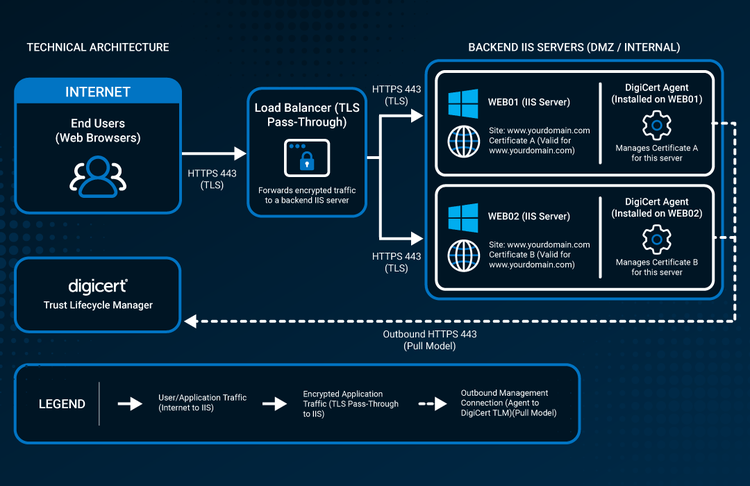
Typical architecture shown for evaluation purposes. Exact load-balancer behavior, health checks, DNS validation design, certificate type, supported Windows/IIS versions, and network controls vary by environment.
Why this scenario matters
Load-balanced IIS environments introduce an important requirement. Whichever backend receives the TLS connection must be ready to serve the site securely. With TLS pass-through, the load balancer is not the certificate endpoint. WEB01 and WEB02 each terminate TLS, so each server needs a valid certificate that covers the same public hostname.
The certificates do not need matching thumbprints. In this architecture, each server has its own certificate and private key, so different serial numbers and thumbprints are expected. What matters is consistent hostname coverage, trusted certificates, aligned cryptographic policy, and timely renewal across every backend.
How DigiCert fits
Agent on each IIS server
Install a DigiCert Agent on WEB01 and WEB02. Each Agent manages the certificate lifecycle for its local IIS endpoint and initiates outbound HTTPS connectivity to DigiCert TLM.
Separate certificates, same hostname
WEB01 and WEB02 each receive a certificate covering the same site hostname. Different thumbprints are normal because the certificates and private keys are separate.
Consistent policy across endpoints
use certificate automation profiles to apply the same CA, algorithm, certificate fields, and renewal settings across both servers while maintaining independent endpoint certificates.
Centralized lifecycle visibility
Trust Lifecycle Manager centralizes inventory and automation-event status so teams can see whether both backends are healthy and up to date.
At a glance
- Environment: two supported Windows Servers running IIS behind one load balancer, serving the same site hostname.
- Load-balancer mode: TLS pass-through. The encrypted client connection is forwarded to WEB01 or WEB02; the load balancer does not terminate TLS in this scenario.
- Certificate model: separate certificates and private keys on each IIS server. Both certificates cover the same hostname; the certificate thumbprints can differ.
- DigiCert deployment model: one DigiCert Agent on each IIS server, centrally managed through DigiCert Trust Lifecycle Manager.
- Management connectivity: each Agent initiates outbound HTTPS 443 to DigiCert. No inbound access is required to manage certificate deployments through TLM.
- Validation approach: DNS-01 is recommended for operational simplicity in a load-balanced environment. HTTP-01 requires public access to port 80 and deterministic challenge routing using a third-party ACME client.
Certificate strategy for this scenario
- Separate certificate per IIS server — Good fit: selected architecture for this scenario. Key qualification: each server generates/manages its own private key and certificate for the same hostname. Different serial numbers and thumbprints are expected. No certificate-file synchronization is needed.
- One identical certificate on both servers — Good fit: environments that intentionally require identical certificate material. Key qualification: requires deploying the same certificate/private-key pair to both endpoints. This increases key sharing and is not part of the architecture used in this article.
- TLS termination at the load balancer — Good fit: environments where the load balancer should be the public TLS endpoint. Key qualification: the load balancer requires its own certificate-management design, and backend encryption becomes a separate TLS session. That is a different deployment scenario.
Technical implementation details
Install a DigiCert Agent on each supported Windows Server running IIS. Each Agent coordinates certificate enrollment for its local endpoints, then downloads and installs the resulting certificates on that server. The two DigiCert Agents operate independently, even though both servers serve the same public hostname.
Use the same certificate automation profile, so both servers follow a consistent CA, algorithm, certificate fields, and renewal policy. A profile can be applied across multiple systems while still allowing each endpoint to receive its own certificate. This avoids deploying one identical certificate and shared private key pairs with every node.
For domain control validation, DNS-01 is generally the best fit because validation occurs through DNS rather than through the load balancer and a selected backend. HTTP-01 is also possible, but only when port 80 is publicly reachable, a supported third-party ACME client is used, and load-balancer challenge routing ensures the correct validation token can be retrieved.
Before deployment, verify currently supported Windows/IIS versions, DigiCert Agent privileges, outbound endpoint allowlists, proxy options, DNS integration requirements, and load-balancer health-check behavior in current DigiCert and vendor documentation. If a load balancer health check validates backend certificate identity or thumbprints, design it so independent certificate renewals do not incorrectly mark healthy servers as unavailable.
Technical resources
- Supported systems — verify current Windows and Microsoft IIS versions supported for managed automation.
- Managed automation workflow — review the Agent-based workflow for server automation and the separation between agents and sensors.
- Create certificate automation profiles — understand profile options, the DigiCert Agent enrollment method, and renewal settings applicable across systems.
- Agent system and network requirements — confirm outbound connectivity, OS prerequisites, DNS resolution, and proxy requirements for each IIS server.
- ACME challenges — compare HTTP-01 and DNS-01 requirements and choose the validation approach that fits the load-balanced environment. DNS-01 is generally preferred.
Frequently asked questions
Ready to evaluate your environment?
See how DigiCert Trust Lifecycle Manager can support certificate lifecycle automation across your enterprise.