How DigiCert automation works
Agents, sensors, integrations, and enrollment clients in Trust Lifecycle Manager.
Start with the deployment target, not the tool
Certificate lifecycle automation involves more than issuing a new certificate. A complete operational workflow may also need to generate or protect keys, complete domain validation, deliver and install the certificate, update a server or appliance binding, reload a service, renew the certificate on schedule, and confirm that the intended endpoint is presenting the replacement certificate.
DigiCert Trust Lifecycle Manager supports several automation and enrollment types. Two core helper applications are the DigiCert Agent and DigiCert Sensor. DigiCert Trust Assistant is a separate enrollment client for supported user and device certificate use cases. It is not the TLM replacement for a server automation agent.
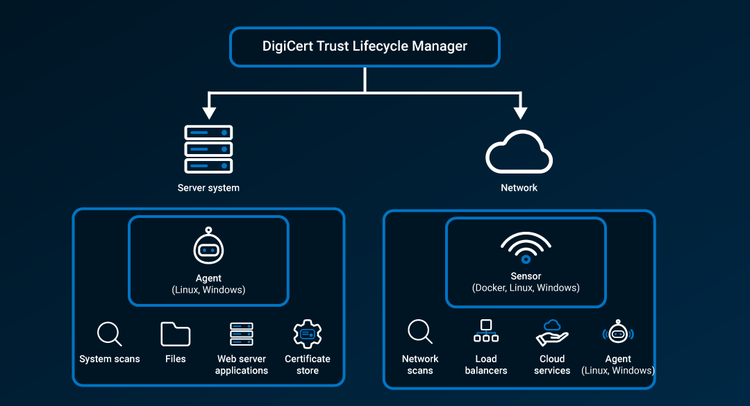
DigiCert Agent: host-level discovery and automation
A DigiCert Agent is installed on a Windows or Linux server and operates locally on that system. It communicates with Trust Lifecycle Manager to discover certificates and perform system-level certificate operations for supported server applications. For managed web-server automation, an agent is installed on each server system that Trust Lifecycle Manager will manage.
Use an agent when:
- You control the server operating system and can install the DigiCert Agent.
- The certificate is installed and managed locally on a Windows or Linux server.
- You want Trust Lifecycle Manager to automate certificate delivery, installation, renewal, and supported application-specific actions on that host.
- You need host-level discovery of certificates in operating-system stores or the local file system.
DigiCert Agents use outbound HTTPS to synchronize with Trust Lifecycle Manager and do not require inbound access. Agents can update themselves as new software versions are released. Administrators can disable agent software auto-updates at the account level when organizational change controls require it.
DigiCert Sensor: network-level gateway, discovery, and automation
A DigiCert Sensor is installed on a dedicated Windows, Linux, or Docker host in your network. Rather than running on the target appliance, the sensor acts as a secure network-level gateway between Trust Lifecycle Manager and supported appliances, cloud services, certificate authorities, vaults, scanners, and other integrations.
Use a sensor when:
- The target is a network appliance, load balancer, cloud service, vault, or other platform that is managed through a supported connector or network protocol.
- You need network-based discovery or connector execution from inside your environment.
- You need a proxy path for DigiCert agents or protocol clients to reach Trust Lifecycle Manager through a controlled outbound connection.
- You are integrating an on-premises or non-DigiCert CA through a network-based connector.
Note: a sensor is not itself a connector. Connectors use a sensor to provide the network path and execute the integration. One sensor can support operations across multiple target systems when network reachability, credentials, connector support, and capacity requirements are satisfied.
DigiCert Trust Assistant: a different type of enrollment client
DigiCert Trust Assistant serves a different purpose than the Agent and Sensor. It is an enrollment client used with Trust Lifecycle Manager certificate profiles for supported user and device certificate use cases. Depending on the profile, Trust Assistant can install certificates in supported operating-system keystores, DigiCert software keystores, or supported hardware tokens.
For server-side managed automation on Windows or Linux web servers, use the DigiCert Agent. Do not use "Trust Assistant" as a synonym for the TLM automation agent.
What about ACME, Kubernetes, and cloud platforms?
Agents and sensors are not the only ways to automate certificates. Trust Lifecycle Manager also supports standards-based enrollment and external automation patterns. For example, a third-party ACME client can request certificates from an approved ACME profile, and Kubernetes environments commonly use cert-manager as the in-cluster certificate controller. These patterns are distinct from installing a DigiCert Agent or Sensor on every workload.
For managed automation of network appliances and cloud services, current DigiCert documentation generally describes a sensor plus the appropriate connector. Exact prerequisites vary by integration, so architecture content should link to the relevant integration guide rather than imply that Trust Lifecycle Manager always calls a cloud API directly from the DigiCert cloud.
Which component fits where?
- Windows or Linux web server — DigiCert Agent, installed on each server being managed. Host-level discovery and managed certificate automation for supported server applications.
- Load balancer / ADC / network appliance — DigiCert Sensor + supported connector; the sensor runs on a dedicated network host. The target device does not need the DigiCert Agent; connector-specific API, SSH, credentials, and network prerequisites apply.
- Cloud service or cloud-managed certificate target — DigiCert Sensor + supported connector/integration; the sensor runs on a dedicated network host. Requirements vary by cloud integration; consult the specific DigiCert integration guide.
- Kubernetes using cert-manager — third-party ACME client pattern; cert-manager runs in the cluster. Use an approved Trust Lifecycle Manager ACME profile and follow the supported ACME/cert-manager design.
- User/device certificate enrollment — DigiCert Trust Assistant, when supported by the profile, installed on the user endpoint. Used for supported certificate enrollment and keystore/token delivery; not a web-server automation agent.
- Custom application / DevOps workflow — REST API, ACME, Admin web request, or other supported pattern; depends on the integration. Choose the pattern that matches the target platform, key-handling requirements, validation, and deployment workflow.
A practical architecture rule
Match the automation approach to the system that actually stores, binds, or consumes the certificate. Then verify the complete lifecycle path such as the authorization, key handling, issuance, installation, service reload or binding change where required, renewal, and post-deployment validation. A certificate that was successfully issued but never became active on the intended endpoint is still an operational failure.