Automated TLS certificate management for multiple IIS websites
Automate certificate lifecycles for a fully encrypted IIS website while preserving your existing Windows Server architecture.
A single Windows Server can host multiple IIS websites, each with its own hostname and certificate requirements. DigiCert Trust Lifecycle Manager (TLM) and a DigiCert Agent can centralize certificate lifecycle management on supported IIS systems while preserving the Windows Certificate Store and IIS binding model. When several HTTPS sites share the same IP address and port, Server Name Indication (SNI) lets IIS select the certificate that corresponds to the requested hostname.
Technical architecture
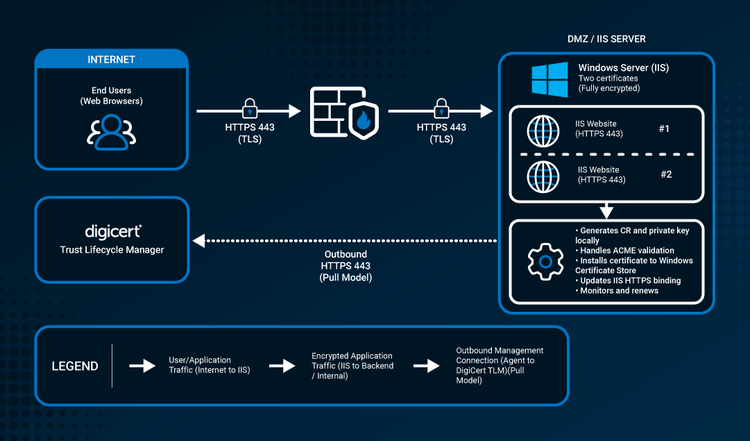
End users connect to the IIS sites over HTTPS 443. One DigiCert Agent on the Windows Server manages the local certificates and initiates outbound HTTPS management connectivity to DigiCert Trust Lifecycle Manager. Typical architecture shown for illustrative purposes. Exact site bindings, certificate strategy, validation method, and network controls vary by environment.
Why this scenario matters
Multiple IIS sites turn one server into several independent certificate lifecycles. A certificate can renew successfully yet still be associated with the wrong hostname or binding, and changes to one shared certificate can affect several sites at once. Shorter public TLS validity periods increase renewal frequency. DigiCert moved to a 199-day maximum as mandated by the CA/Browser Forum for newly issued public TLS certificates on February 24, 2026, with further reductions planned to 99 days in early 2027 and 46 days in early 2029.
Automation needs to manage more than certificate issuance. Teams also need visibility into which certificate protects each hostname, how IIS bindings are configured, and whether the certificate strategy matches the operational needs of the sites sharing the server.
How DigiCert fits
- One Agent for the IIS host — install a DigiCert Agent once on the supported Windows Server. The DigiCert Agent can manage multiple certificate automation events on that host; you don't need a separate DigiCert Agent for each IIS site.
- SNI-aware multi-site automation — DigiCert supports SNI automation for Microsoft IIS, so multiple HTTPS certificates can be hosted on the same IP address and port. TLM also supports SNI information scripts that can supply active SNI FQDNs to Agents.
- Local certificate deployment — the DigiCert Agent performs certificate operations on the IIS host, installs certificates into the Windows certificate environment, and supports IIS certificate deployment/binding workflows on supported versions.
- Outbound management connectivity — the DigiCert Agent initiates outbound HTTPS connectivity to DigiCert. TLM does not need to initiate an inbound management session to the IIS server.
At a glance
- Environment: one supported Windows Server running IIS with multiple HTTPS sites and hostnames.
- DigiCert deployment model: Trust Lifecycle Manager with one DigiCert Agent installed on the IIS server.
- HTTPS architecture: end users → HTTPS 443 → firewall → HTTPS 443 → IIS sites.
- Shared IP/port: use SNI when multiple HTTPS sites share the same IP address and port.
- Validation approach: DNS-based validation is often the cleanest fit for multi-site environments; HTTP-based validation is conditional and requires public HTTP reachability and correct challenge routing with a suitable third-party ACME client.
- Certificate strategy: separate certificates per site, a wildcard certificate where appropriate, or a multi-domain/SAN certificate. Choose based on ownership, change frequency, blast radius, and policy.
Choose a certificate strategy
- Separate certificate per site — Good fit: sites with independent owners, policies, or change schedules. Key qualification: each hostname has an independent lifecycle. This gives strong isolation but increases the number of certificates and renewal events to manage.
- Wildcard certificate — Good fit: many first-level subdomains under the same base domain with similar lifecycle needs. Key qualification: a wildcard identity such as *.example.com covers matching first-level subdomains. The apex/base domain is a separate DNS identity. Verify whether the selected DigiCert product/order includes it as an additional SAN. Automated wildcard validation requires DNS-based DCV.
- Multi-domain / SAN certificate — Good fit: a stable, known set of hostnames that should share one certificate lifecycle. Key qualification: adding or removing SANs changes the certificate and generally requires reissuance. A change can therefore affect every site sharing that certificate.
Technical implementation details
SNI is an IIS/application-layer requirement, not a DigiCert-specific protocol. When multiple HTTPS sites share the same IP address and port, HTTPS bindings must be designed so IIS can select the intended certificate for each hostname.
For domain control validation, DNS-based validation avoids exposing HTTP port 80 solely for validation and avoids per-site HTTP redirect/challenge-path dependencies. HTTP-based validation can still be used where supported with a supported third-party ACME client, but each hostname being validated must be reachable as required by the validation method, and IIS routing/redirect behavior must not prevent access to the challenge path.
Wildcard certificates require DNS-based validation. HTTP-01 cannot validate wildcard names. For SAN certificates, adding new names generally requires reissuing the certificate, and any newly added domains must complete the applicable validation.
Confirm that the supported Windows/IIS versions, Agent privileges, endpoint allowlists, proxy options, key-storage behavior, SNI configuration, and automation profile behavior are documented in the current DigiCert documentation before deployment.
Technical resources
- Supported systems — verify currently supported Windows and Microsoft IIS versions for managed automation.
- Get multiple TLS/SSL certificates using SNI automation — review DigiCert guidance for hosting and automating multiple HTTPS certificates with SNI, including Microsoft IIS.
- Agent scripts: SNI information — see how TLM can use an SNI information script to supply active SNI FQDNs to DigiCert Agents.
- Agent system and network requirements — confirm Windows prerequisites, outbound connectivity, DNS resolution, and proxy options.
- Add SANs to a multi-domain certificate — understand the reissue workflow when adding hostnames to a multi-domain/SAN certificate.
Frequently asked questions
Ready to evaluate your environment?
See how DigiCert Trust Lifecycle Manager can support certificate lifecycle automation across your enterprise.