Articles
How ACME Renewal Information (ARI) works

{{anchor:Introduction}}
Let the certificate authority help your ACME client choose when to renew.
ACME automates certificate requests and issuance, but the client still needs to decide when to request a replacement. Many clients use a local rule, such as renewing after a percentage of the certificate’s lifetime has passed or some number of days before scheduled expiration. Such a rule can't anticipate a problem that requires earlier replacement.
ACME Renewal Information, an extension to the ACME standard, gives the certificate authority (CA) a way to publish a suggested renewal window for each certificate. An ARI-capable client checks that information and uses it to schedule renewal. If circumstances change, the CA can update the window so the client can renew before its planned renewal date.
ARI isn’t widely unknown, but expect it to get more attention in the future. The Automation section of the Chrome draft Quantum-Resistant Root Policy makes ARI mandatory for some purposes.
Why renewal timing matters
A certificate can need replacement well before expiration. For example, a CA may discover an issuance or validation problem and have to revoke affected certificates. Waiting for a routine renewal date can leave services using a revoked certificate, resulting in a service outage. ARI automates early replacement, reducing dependence on administrators to receive and act on an incident notice in time.
As certificate lifetimes shorten, renewal schedules must adapt to the certificates actually being issued. Without ARI, you have to make those scheduling changes yourself. With ARI, the CA can make those changes for you without touching your own systems or network. The CA can also spread suggested renewal windows across its certificate population for load balancing purposes.
{{anchor:How it works}}
How ARI works, step by step
Discover ARI support
The client reads the CA’s ACME directory. A renewalInfo URL advertises ARI support. Both the CA and the client need to support the extension. DigiCert CertCentral® and the free DigiCert CertCentral ACME client support ARI.
Ask about a specific certificate
The client constructs a certificate identifier from the certificate’s Authority Key Identifier and serial number, then sends an HTTPS GET request to the renewalInfo endpoint for that identifier.
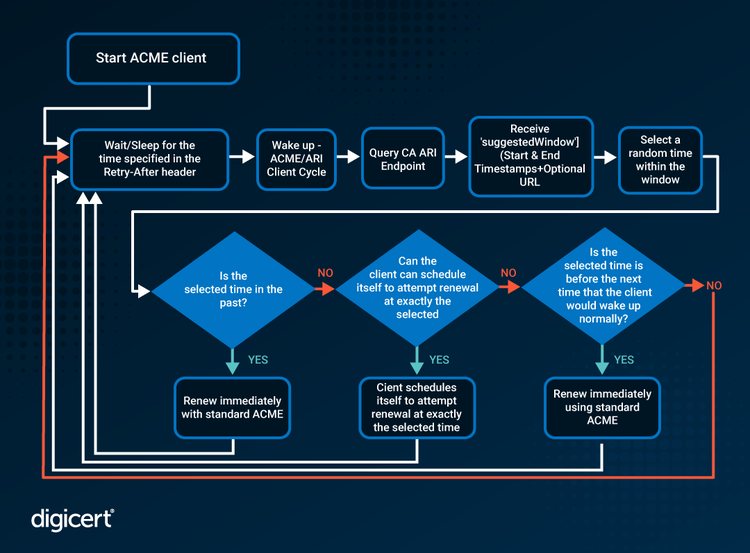
Read the suggested window
The response contains suggestedWindow with start and end timestamps. An optional explanationURL can provide context, such as information about an incident.
Schedule and keep checking
The recommended algorithm chooses a random time within the window to spread requests for load balancing. A Retry-After response header tells the client when to check ARI again. It does not tell the client when to renew. The client must revisit renewal information so it can learn about changed windows.
Request a replacement
When it determines that renewal is due, the client creates an ACME order. The optional replaces field identifies the predecessor certificate, letting the service connect the new order to the certificate being replaced. This step and the next use the standard ACME rules.
Deploy and verify
The configured automation must download and install the certificate, update bindings or reload services where necessary, and confirm that the intended endpoints present it. Issuance alone does not establish that deployment succeeded.
{{anchor:What to check before relying on ARI}}
What to check before relying on ARI
Start with the exact ACME directory URL and client version used in production. General ACME support doesn’t establish ARI support. Check the client’s documentation and confirm in its logs that renewal information is being retrieved and used.
Review how often the client runs. A client launched only once a month can't discover an urgent window between runs. Its execution schedule needs to support the service’s polling interval, with retries and backoff for failures. Set alerts on repeated ARI errors and retain a fallback renewal schedule appropriate to the certificate’s actual lifetime. Renewing somewhat early costs little, but renewing too late can cause an outage.
Test the complete replacement path, including validation, installation, and the live endpoint. For a load-balanced service, check every certificate termination point. Plan for an early replacement to pass through the same operational controls as a routine renewal.
{{anchor:Why DigiCert}}
Where DigiCert fits
DigiCert supports ACME through CertCentral and Trust Lifecycle Manager. Trust Lifecycle Manager adds enterprise discovery, inventory, policy, and automation across supported certificate sources and deployment targets. Choose the automation pattern that fits the system consuming the certificate.
For an ARI deployment, confirm support for the particular DigiCert ACME service, certificate workflow, and client version you will use. Check that the directory advertises renewalInfo and verify client behavior before making ARI part of your incident response plan.
{{anchor:Frequently asked questions}}
Frequently asked questions
{{anchor:Resources}}
Supplemental resources
{{anchor:Next steps}}
Ready to evaluate your environment?
See how DigiCert Trust Lifecycle Manager can support certificate lifecycle automation across your enterprise.