Co-authored by Shane Barbetta
In laser tag, a tag helps you identify exactly what you hit. In a growing DNS environment, tags can provide a similarhelp bring that same kind of clarity.
When zones belong to different applications, teams, regions, or deployment stages, naming conventions can only gotake you so far. Resource Tagging in DigiCert UltraDNS gives you another way to organize and find DNS resources without changing DNS behavior.
What is zone tagging?
Zone tagging lets you attachadd descriptive labels to an UltraDNS zone using a key=value format, such as:
- env=prod
- region=us-east
- team=platform
- bu=finance
The key identifies the category, while the value describes how the zone is classified. For example, env=prod identifies a zone as part of a production environment.
Tags are management metadata. Adding, changing, or removing a tag doesn’t affect DNS resolution or the behavior of the zone.
UltraDNS Resource Tagging can also be usedalso works with records, pools, and users.
How zone tagging works
Tagging starts with a shared taxonomy: the keys and values your organizationteams will use to classify resources.
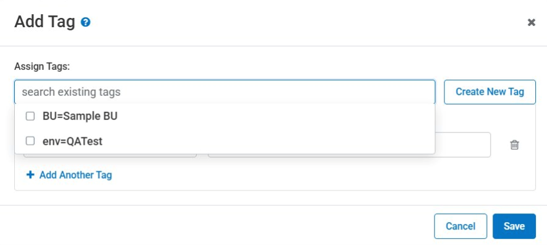
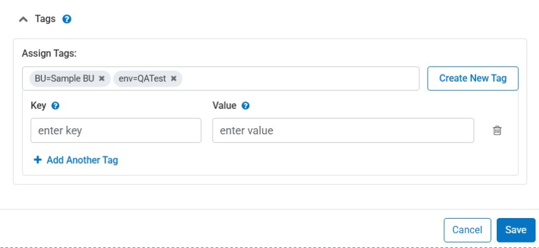
Administrators manage that taxonomy centrally, so teams can use consistent labels across the account. Users can then assign approved tags through the UltraDNS portal or API and update them as ownership or operational requirements change.
Once resources are tagged, usersyou can filter them by tag key or value., making it easier That makes it easier to zero in on the to find the right resources without relying only on zone names or manually maintained inventories.
For example, you could filter by env=prod to find production resources or team=platform to identify resources owned by the platform team.
Common ways to tag UltraDNS zones
The best taxonomy is one that reflects how your teams already organize infrastructure.
Environment
Use tags such as env=prod, env=staging, and env=dev to distinguish production zones from testing and development resources.
Team or business unit
Labels such as team=platform or bu=finance make ownership clearer when several teams share the same UltraDNS account.
Region or data center
A tag such as region=us-east can group zones by geography or infrastructure location.
Application
Application tags can identify the DNS resources associated with a particular service or system.
A zone can carry several tags at once, so you can find the same resource can be found throughusing different filters.
Why zone tagging helps
Faster resource discovery
Tags let you find zones using meaningful business or operational attributes instead of searching through long resource lists.
No impact on DNS behavior
Because tags are metadata, you can improve resource organization without changing DNS configurations or resolution behavior.
Consistent management
Central administration helps reduceprevent duplicate or inconsistent tags. Instead of one team using prod and another using production, administrators can define approved values for everyone to use.
Portal and API support
Teams can manage tags through the UltraDNS portal or automate tagging through the API, which is useful for environments where resources are created programmatically.
Tagging zones at scale
You don’t have to tag every zone manually. The UltraDNS API can apply tags programmatically across resources, supporting bulk classification and automated provisioning workflows.
For example, automation could assign environment and ownership tags whenever it creates a new zone. If a resource changes owners or moves between environments, those tags can be updated without modifying the underlying DNS service.
Frequently asked questions
Can I search or filter zones by tag?
Yes. UltraDNS lets useryous filter resources by tag key or value through the portal or API.
Can I add more than one tag to a zone?
Yes. A zone can usehave multiple tags for different classifications, such as environment, region, team, or application.
Can tags change DNS behavior?
No. Tags provide organizational metadata and don’t affect DNS behavior.
Can I update or remove tags?
Yes. Tags can be You can added, edited, or removed taqgs through the portal or API.
Put the right DNS resources in your sights
As DNS environments grow, the challenge isn’t always configuring another zone. Sometimes it’s finding the right one.
Zone tagging gives UltraDNS customers a flexible way to add useful context to DNS resources. A consistent taxonomy can make ownership clearer, simplify resource discovery, and make tagging easier to build into automated workflows.
Start with the categories your teams already use, such as environment, owner, application, or region. Then define the corresponding tag keys and values and apply them through the UltraDNS portal or API.
No laser blasters required.
For additional product information, visit https://www.digicert.com/dns or contact your UltraDNS product team.
Subscribe to the blog
-

DigiCert is a global leader in intelligent trust, securing people, data, and devices with AI-powered solutions built to stop threats today and prepare for a quantum-safe future.
-



-
© 2026 DigiCert, Inc. All rights reserved.
Legal Repository Audits & Certifications Terms of Use Privacy Center Accessibility Cookie Settings