Creating a CSR and installing your SSL Certificate on Windows Server 2008
Use the instructions on this page to create your certificate signing request (CSR) and then to install your SSL certificate in IIS 7 on Windows Server 2008.
- To create your CSR, see IIS 7: How to Create Your CSR on Windows Server 2008.
- To install your SSL certificate, see IIS 7: How to Install and Configure Your SSL Certificate on Windows Server 2008.
If you are looking for a simpler way to create CSRs and install and manage your SSL Certificates, we recommend using the DigiCert® Certificate Utility for Windows. You can use the DigiCert Utility to generate your CSR and install your SSL certificate. See Windows Server 2008: Create CSR & Install SSL Certificate with DigiCert Utility.
Step 1: Create Your CSR in IIS 7 on Windows Server 2008
Want to watch how it's done? Check out our IIS 7 CSR video walkthrough.
IIS 7 CSR video walkthrough
-
From the Windows Start menu, find Internet Information Services (IIS) Manager and open it (click Administrative Tools > Internet Information Services (IIS) Manager).
-
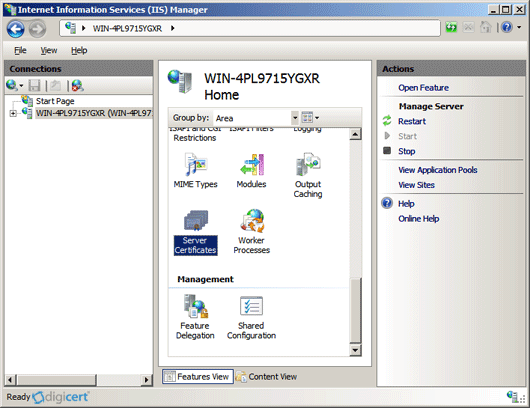
In the Connections pane, locate and click the server.
-
In the server Home page (center pane) under the IIS section, double-click Server Certificates.
-
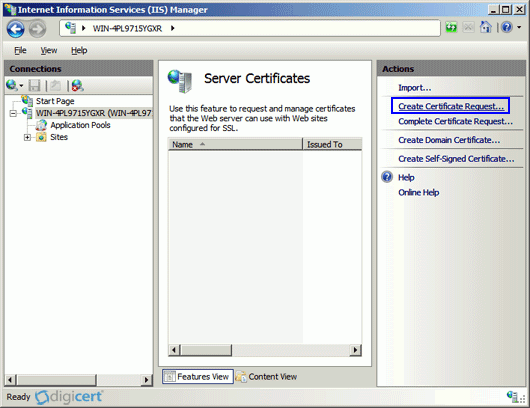
In the Actions menu (right pane), click Create Certificate Request.
-
In the Request Certificate wizard, on the Distinguished Name Properties page, provide the information specified below and then click Next.
Common name: The fully-qualified domain name (FQDN) (e.g., www.example.com). Organization: Your company’s legally registered name (e.g., YourCompany, Inc.). Organizational unit: The name of your department within the organization. This entry will usually be listed as "IT", "Web Security", or is simply left blank. City/locality: The city where your company is legally located. State/province: The state/province where your company is legally located. Country/region: The country/region where your company is legally located. Use the drop-down list to select your country. 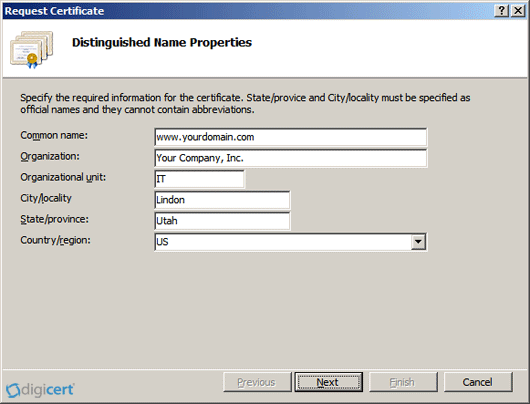
-
On the Cryptographic Service Provider Properties page, provide the information specified below and then click Next.
Cryptographic service provider: In the drop-down list, select Microsoft RSA SChannel Cryptographic Provider (unless you have a specific cryptographic provider). Bit length: In the drop-down list, select 2048 (unless you have a specific reason for using a larger bit length). 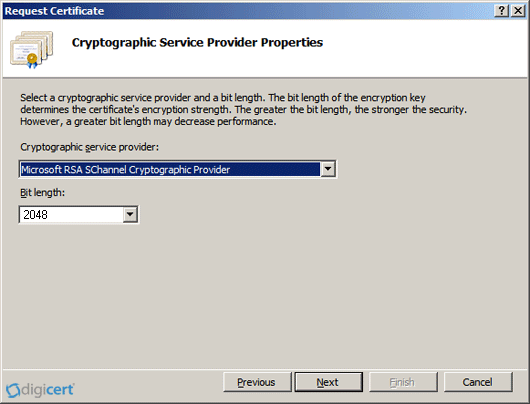
-
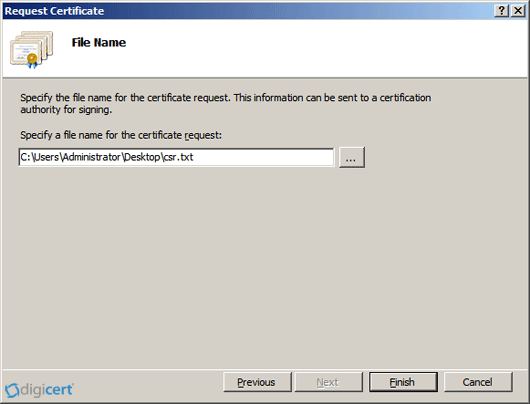
On the File Name page, under Specify a file name for the certificate request, click the … button to specify a save location for your CSR.
Note: Remember the filename and save location of your CSR file. If you enter a filename without specifying a location, your CSR will be saved to C:\Windows\System32.
-
When you are done, click Finish.
-
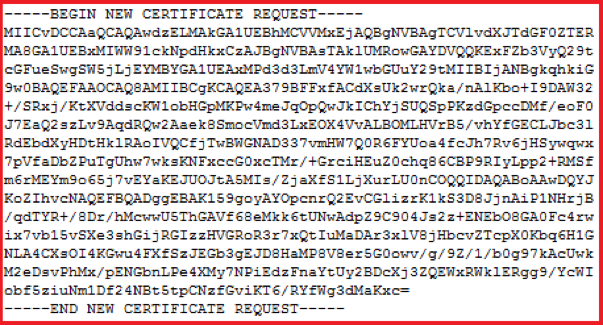
Open the CSR file using a text editor (such as Notepad), then copy the text (including the -----BEGIN NEW CERTIFICATE REQUEST----- and -----END NEW CERTIFICATE REQUEST----- tags) and paste it into the DigiCert order form.
-
After you receive your SSL certificate from DigiCert, you can install it.
Step 2: Install and Configure Your SSL Certificate in IIS 7 on Windows Server 2008
If you have not yet created a CSR and ordered your certificate, see IIS 7: How to Create Your CSR on Windows Server 2008.
After we validate and issue your SSL certificate, you need to install it on the Windows 2008 server where the CSR was generated. Then, you need to configure the server to use it.
How to install your SSL certificate and configure the server to use it
Want to watch how it's done? Check out our IIS 7 SSL certificate installation how to video.
IS 7 installation video walkthrough
-
On the server where you created the CSR, save the SSL certificate .cer file (e.g., your_domain_com.cer) that you received from DigiCert.
-
Open Internet Information Services (IIS) Manager (click Start > Administrative Tools > Internet Information Services (IIS) Manager).
-
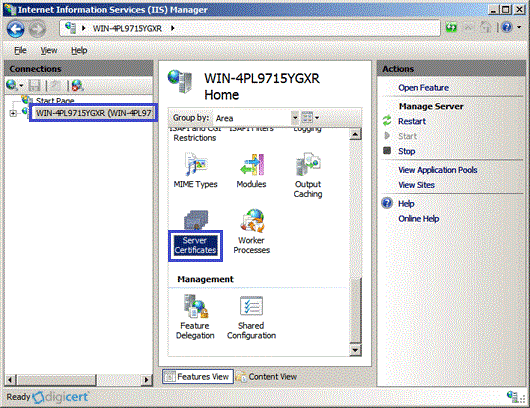
In the Connections pane, locate and click the server.
-
In the server Home page (center pane) under the IIS section, double-click Server Certificates.
-
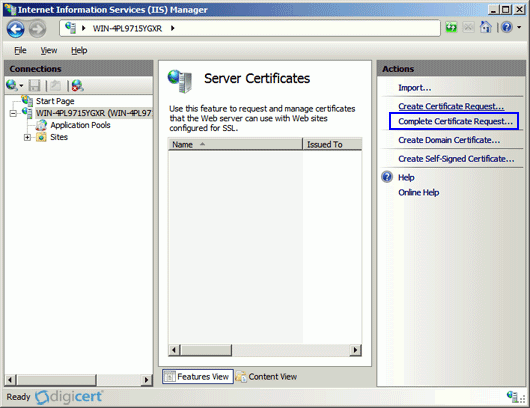
In the Actions menu (right pane), click Complete Certificate Request.
-
In the Complete Certificate Request wizard, on the Specify Certificate Authority Response page, provide the following information:
File name containing the certificate authority's response: Click the … button to locate the .cer file you received from DigiCert
(e.g., your_domain_com.cer).Friendly name: Type a friendly name for the certificate. This is not part of the certificate; instead, it is used to identify the certificate.
Note: We recommend that you add the issuing CA (e.g., DigiCert) and the expiration date to the end of your friendly name; for example, yoursite-digicert-(expiration date). Doing this helps identify the issuer and expiration date for each certificate and also helps distinguish multiple certificates with the same domain name.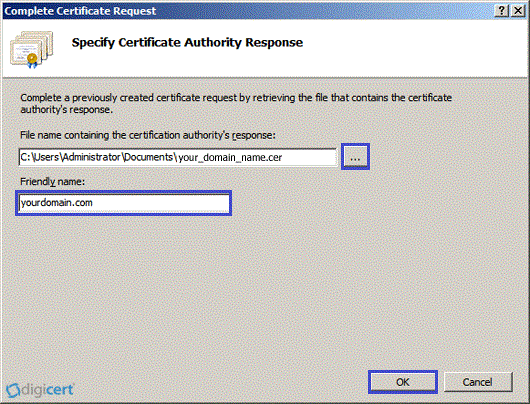
-
Click OK to install the certificate.
Note: There is a known issue in IIS 7 where the following message is displayed: "Cannot find the certificate request associated with this certificate file. A certificate request must be completed on the computer where it was created." You may also receive a message stating: "ASN1 bad tag value met."
If this is the server where you generated the CSR, it's possible the certificate is actually installed and the message can be ignored. Simply click OK, then close and reopen Internet Information Services (IIS) Manager to refresh the list of server certificates. The new certificate should appear in the Server Certificates list, and you can continue with the next step.
If the new certificate does not appear in the Server Certificate list, you need to do one of the following:
- Reissue your certificate (see Reissuing a DigiCert SSL Certificate).
- Use the DigiCert Certificate Utility to import the certificate (see SSL Certificates CSR Creation :: IIS 7).
-
Now that you've successfully installed your SSL certificate, you need to configure your site to use it.
-
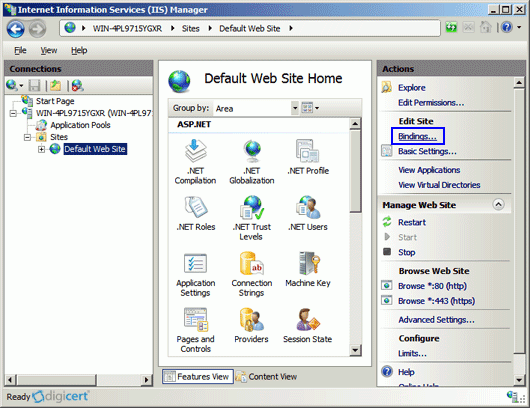
In Internet Information Services (IIS) Manager, in the Connections pane, expand the name of the server on which the certificate was installed. Then expand Sites and click the site you want to secure using the SSL certificate.
-
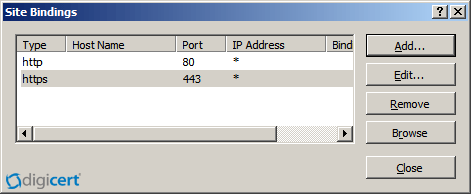
In the Actions menu (right pane), click Bindings.
-
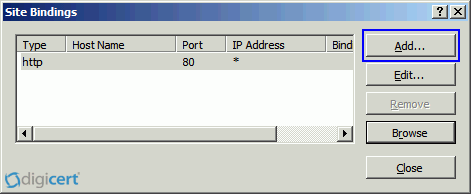
In the Site Bindings window, click Add.
-
In the Add Site Binding window, do the following and then click OK.
Type: In the drop-down list, select https. IP address: In the drop-down list, select the IP address of the site or select All Unassigned. Port: Type 443. (SSL uses port 443 to secure traffic.) SSL certificate: In the drop-down list, select your new SSL certificate (e.g., yourdomain.com). 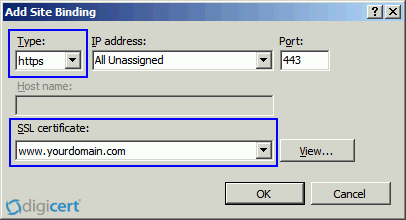
-
Your SSL certificate is now installed, and the website is configured to accept secure connections.
Install Your SSL Certificate
Assign Your SSL Certificate
Note: To enable your SSL certificate for use on other Windows servers, see PFX export instructions.
Test Installation
If your website is publicly accessible, our DigiCert® SSL Installation Diagnostic Tool can help you diagnose common problems.
Additional Information
-
To enable your SSL certificate for use on other Windows servers, see PFX export instructions.
-
For help with your certificate installation or troubleshooting, try our Windows SSL management utility.
-
For instructions on disabling the SSLv3 protocol, see Microsoft IIS: Disabling the SSL v3 Protocol.