Create a CSR using OpenSSL & install your SSL certificate on your Apache server
Increase trust in your apps and code with a DigiCert code signing certificate.
Buy NowUse the instructions on this page to use OpenSSL to create your certificate signing request (CSR) and then to install your SSL certificate on your Apache server.
Restart Note: After you've installed your SSL/TLS certificate and configured the server to use it, you must restart your Apache instance.
For Ubuntu instructions, see Ubuntu Server with Apache2: Create CSR & Install SSL Certificate (OpenSSL). For other OS/platform instructions, see Create a CSR (Certificate Signing Request).
You can use these instructions to create OpenSSL CSRs and install all types of DigiCert SSL certificates on your Apache server: Standard SSL, EV SSL, Multi-Domain SSL, EV Multi-Domain SSL, and Wildcard SSL.
-
To create your certificate signing request (CSR), see Apache: Creating Your CSR with OpenSSL.
Para un tutorial en español visite la página Apache Crear CSR.
-
To install your SSL certificate, see Apache: Installing & Configuring Your SSL Certificate.
Visite nuestras instrucciones en español para Apache Instalar Certificado SSL.
I. Apache: Creating Your CSR with OpenSSL
Use the instructions in this section to create your own shell commands to generate your Apache CSR with OpenSSL.
Recommended: Save yourself some time. Use the DigiCert OpenSSL CSR Wizard to generate an OpenSSL command to create your Apache CSR. Just fill out the form, click Generate, and then paste your customized OpenSSL command into your terminal.
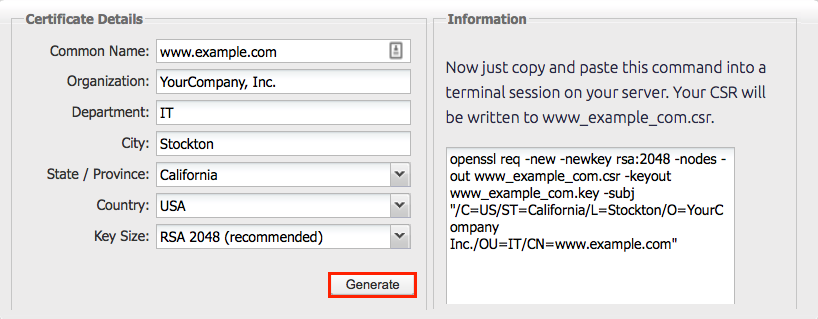
How to Generate a CSR for Apache Using OpenSSL
If you prefer to build your own shell commands to generate your Apache CSR, follow the instructions below.
-
Log in to your server via your terminal client (ssh).
-
Run Command
At the prompt, type the following command:
Note: Make sure to replace server with the name of your server.
openssl req -new -newkey rsa:2048 -nodes -keyout server.key -out server.csr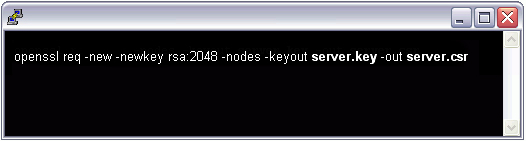
-
Generate Files
-
You've now started the process for generating the following two files:
- Private-Key File: Used to generate the CSR and later to secure and verify connections using the certificate.
- Certificate Signing Request (CSR) file: Used to order your SSL certificate and later to encrypt messages that only its corresponding private key can decrypt.
-
When prompted for the Common Name (domain name), type the fully qualified domain (FQDN) for the site that you are going to secure.
Note: If you're generating an Apache CSR for a Wildcard certificate, make sure your common name starts with an asterisk (e.g., *.example.com).
-
When prompted, type your organizational information, beginning with your geographic information.
Note: You may have already set up default information.
-
Now, your OpenSSL .csr file is created.
-
-
Order Your SSL/TLS Certificate
-
Open the .csr file you created with a text editor.
-
Copy the text, including the -----BEGIN NEW CERTIFICATE REQUEST----- and -----END NEW CERTIFICATE REQUEST----- tags, and paste it in to the DigiCert order form.
-
-
Save Private Key
Save (back up) the generated .key file. You need it later to install your SSL certificate.
-
Install Certificate
After you've received your SSL certificate from DigiCert, you can install it on your server.
II. Apache: Installing & Configuring Your SSL Certificate
If you still need to create a certificate signing request (CSR) and order your certificate, see Apache: Creating Your CSR with OpenSSL.
After we've validated and issued your SSL certificate, you can install it on your Apache server (where the CSR was generated) and configure the server to use the certificate.
How to Install and Configure Your SSL Certificate on Your Apache Server
-
Copy the certificate files to your server.
-
Log in to your DigiCert account and download the intermediate (DigiCertCA.crt) and your primary certificate (your_domain_name.crt) files.
-
Copy these files, along with the .key file you generated when creating the CSR, to the directory on the server where you keep your certificate and key files.
Note: Make them readable by root only to increase security.
-
-
Find the Apache configuration file (httpd.conf) you need to edit.
The location and name of the configuration file can vary from server to server—especially if you're using a special interface to manage your server configuration.
-
Apache's main configuration file is typically named httpd.conf or apache2.conf. Possible locations for this file include /etc/httpd/ or /etc/apache2/. For a comprehensive listing of default installation layouts for Apache HTTPD on various operating systems and distributions, see Httpd Wiki - DistrosDefaultLayout.
-
Often, the SSL certificate configuration is located in a <VirtualHost> block in a different configuration file. The configuration files may be under a directory like /etc/httpd/vhosts.d/, /etc/httpd/sites/, or in a file called httpd-ssl.conf.
One way to locate the SSL Configuration on Linux distributions is to search using grep, as shown in the example below.
Run the following command:
grep -i -r "SSLCertificateFile" /etc/httpd/Note: Make sure to replace /etc/httpd/ with the base directory for your Apache installation.
-
-
Identify the SSL <VirtualHost> block you need to configure.
If your site needs to be accessible through both secure (https) and non-secure (http) connections, you need a virtual host for each type of connection. Make a copy of the existing non-secure virtual host and configure it for SSL as described in step 4.
If your site only needs to be accessed securely, configure the existing virtual host for SSL as described in step 4.
-
Configure the <VirtualHost> block for the SSL-enabled site
-
Below is a very simple example of a virtual host configured for SSL. The parts listed in blue are the parts you must add for SSL configuration.
<VirtualHost 192.168.0.1:443> DocumentRoot /var/www/html2 ServerName www.yourdomain.com SSLEngine on SSLCertificateFile /path/to/your_domain_name.crt SSLCertificateKeyFile /path/to/your_private.key SSLCertificateChainFile /path/to/DigiCertCA.crt </VirtualHost> -
Make sure to adjust the file names to match your certificate files.
-
SSLCertificateFile is your DigiCert certificate file (e.g., your_domain_name.crt).
-
SSLCertificateKeyFile is the .key file generated when you created the CSR (e.g., your_private.key).
-
SSLCertificateChainFile is the DigiCert intermediate certificate file (e.g., DigiCertCA.crt)
Note: If the SSLCertificateChainFile directive does not work, try using the SSLCACertificateFile directive instead.
-
-
-
Test your Apache configuration file before restarting.
As a best practice, check your Apache configuration file for any errors before restarting Apache.
Caution: Apache won't start again if your configuration files have syntax errors.
Run the following command to test your configuration file (on some systems, it's apache2ctl):
apachectl configtest -
Restart Apache.
You can use apachectl commands to stop and start Apache with SSL support.
apachectl stop
apachectl start
Restart Notes:
If Apache doesn't restart with SSL support, try using apachectl startssl instead of apachectl start. If SSL support only loads with apachectl startssl, we recommend you adjust the apache startup configuration to include SSL support in the regular apachectl start command. Otherwise, your server may require to manually restart Apache using apachectl startssl in the event of a server reboot. This usually involves removing the <IfDefine SSL> and </IfDefine> tags that enclose your SSL configuration.
-
Congratulations! You've successfully installed your SSL certificate.
Testing Your SSL/TLS Certificate Installation
-
Browser Test
-
For best results, make sure to close your web browser first and then re-launch it.
-
Visit your site with the secure https URL (i.e., go to https://www.example.com not http://www.example.com).
-
Be sure to test your site with more than just Internet Explorer. IE downloads missing intermediate certificates; whereas, other browsers give an error if all the certificates in the certificate chain aren't installed properly.
-
-
DigiCert® SSL Installation Diagnostic Tool
If your site's publicly accessible, use our Server Certificate Tester to test your SSL/TLS certificate installation; it detects common installation problems.
Troubleshooting
-
If your web site's publicly accessible, our SSL Certificate Tester tool can help you diagnose common problems.
-
If you receive a "not trusted" warning, view the certificate details to see if it's the certificate you expect. Check the Subject, Issuer, and Valid To fields.
-
If it's the certificate you expect and the SSL certificate is issued by DigiCert, then your SSLCertificateChainFile is not configured correctly.
-
If you don't see the certificate you expect, then you may have another SSL <VirtualHost> block before the one you recently configured.
Name based virtual hosts aren't possible with https unless you use the same certificate for all virtual hosts (e.g., a Wildcard or a Multi-Domain SSL certificate).
This is not an Apache limitation, but an SSL protocol limitation. Apache must send a certificate during the SSL handshake before it receives the HTTP request that contains the Host header. Therefore, Apache always sends the SSLCertificateFile from the first <VirtualHost> block that matches the IP and port of the request.
-
-
For help moving your certificates to additional servers or across server platforms, see our OpenSSL export instructions.
-
If you need to disable SSL version 2 compatibility in order to meet PCI Compliance requirements, add the following directive to your Apache configuration file:
SSLCipherSuite HIGH:+MEDIUM:!SSLv2:!EXP:!ADH:!aNULL:!eNULL:!NULLIf the directive already exists, you may need to modify it to disable SSL version 2.
-
For instructions on how to fix common errors and for additional tips, see Troubleshooting Apache SSL Certificate Errors.
Apache Server Configuration
For information about Apache server configurations that can strengthen your SSL environment, see the following resources:
-
For Instructions on disabling the SSL v3 protocol, see Apache: Disabling the SSL v3 Protocol.
-
For information about enabling perfect forward secrecy, see Enabling Perfect Forward Secrecy.