Security Certificate Errors
Increase trust in your apps and code with a DigiCert code signing certificate.
Buy NowThe following warnings are presented when you access a website that has a security certificate installed that was issued to a domain other than the you accessed.
Internet Explorer: "The security certificate presented by this website was issued for a different website's address."
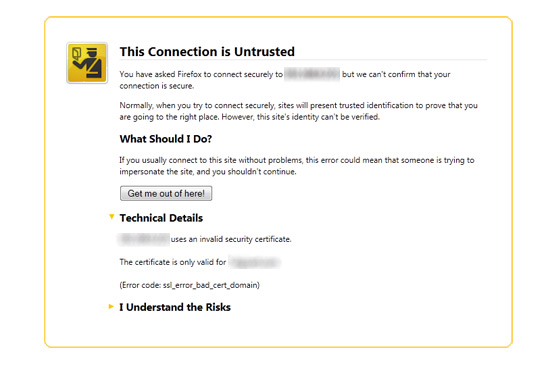
Firefox: "www.example.com uses an invalid security certificate." or "The certificate is only valid for the following names: www.otherdomain.com , otherdomain.com"
This happens when the common name to which an SSL Certificate is issued (e.g., www.example.com) doesn't exactly match the name displayed in the URL bar. Any difference will cause the web browser to halt and display a name mismatch error. This error can happen even if the correct certificate is installed properly. For example, you connect to the website via the IP address or an internal name but the certificate was issued to the fully-qualified domain name (or vice versa).
It is also possible that a self-signed certificate could be installed instead of a server-specific security certificate issued by a Certificate Authority (like DigiCert), or that the domain name was misspelled in the request.
If your website is secured by a certificate with the name www.example.com you will receive this error if you connect using any of the following names:
- example.com
- example.local
- 208.77.188.166
- 10.1.1.7
Even though all of the above addresses would get you to a site with a valid certificate, you could still get a name error if you are connecting to a name other than the one that the certificate was issued to.
DigiCert's Multi-Domain (SAN) Certificates were designed to resolve this problem by allowing one certificate to be issued to multiple names (i.e., fully-qualified domain names or IP addresses).
To check your certificate for a name error, we recommend that you use our SSL Certificate Checker. Enter your domain in the server address box; if the certificate name doesn't match, you will get an error message stating "Certificate does not match name example.com".
Below are a few more warning messages for different browsers.
Google Chrome: "This is probably not the site you are looking for! You attempted to reach www.site.com, but instead you actually reached a server identifying itself as othersite.com. This may be caused by a misconfiguration on the server or by something more serious. An attacker on your network could be trying to get you to visit a fake (and potentially harmful) version of www.site.com. You should not proceed."
Internet Explorer 6: "Information you exchange with this site cannot be viewed or changed by others. However, there is a problem with the site's security certificate. The name on the security certificate is invalid or does not match the name of the site. Do you want to proceed?"
Internet Explorer 7: "There is a problem with this website's security certificate. The security certificate presented by this website was issued for a different website's address. Security certificate problems may indicate an attempt to fool you or intercept any data you send to the server."
Firefox 3&4: "You have asked Firefox to connect securely to www.example.com, but we can't confirm that your connection is secure. Normally, when you try to connect securely, sites will present trusted identification to prove that you are going to the right place. However, this site's identity can't be verified. www.example.com uses an invalid security certificate. The certificate is only valid for the following names: www.otherdomain.com , otherdomain.com"
"You have attempted to establish a connection with "www.site.com". However, the security certificate presented belongs to "www.othersite.com". It is possible, though unlikely, that someone may be trying to intercept your communication with this web site. If you suspect the certificate shown does not belong to "www.site.com", please cancel the connection and notify the site administrator."
- About DigiCert
- Contact DigiCert
- DigiCert Blog
- Terms & Conditions
- Privacy Policy
- No Hassle Refund Policy