Zero Trust has evolved from a network security buzzword into a strategic model for securing all digital interactions. The principle is consistent across every implementation: Never trust, always verify.
Organizations have embraced this framework for user access, device authentication, and web traffic. They issue certificates to verify website identity and encrypt connections with TLS. They require multi-factor authentication (MFA) before granting access to sensitive systems.
But one piece of the trust chain is frequently overlooked.
Email (the most common vector for cyberattacks) often operates outside the Zero Trust model. Messages arrive claiming to be from trusted sources, and most organizations accept them at face value. No verification. No authentication. Just implicit trust in a text field.
That's not Zero Trust—it’s the opposite.
Below, we’ll look at how DMARC, PKI, and TLS work together to create a layered Zero Trust architecture that spans both web and email channels.
Different protocols, same principle: Verify identity before trusting communication.
What is Zero Trust?
Zero Trust isn't a product you can buy. It's not a single technology or a checkbox on a compliance form. It's a framework built on one core idea: no implicit trust.
Traditional security models assumed that anything inside the network perimeter was safe. If you were on the corporate network, you were trusted. If a request came from an internal IP, it was probably legitimate.
That model doesn't hold up anymore.
Attackers breach perimeters. Credentials get stolen. Insiders go rogue. Remote work has dissolved the boundary between "inside" and "outside" the network entirely.
Zero Trust flips the assumption. Every request is treated as potentially hostile until proven otherwise. Every user, device, and connection must be authenticated and authorized, regardless of where it originates.
The framework rests on a few key principles:
- Verify explicitly. Always authenticate based on all available data points.
- Use least privilege access. Limit permissions to the minimum necessary.
- Assume breach. Design systems expecting that attackers are already inside.
These principles apply everywhere: user access, device management, application security, network segmentation.
And they should apply to email. But all too often, they don't.
How PKI and TLS secure web traffic
Public key infrastructure (PKI) is the system that issues, manages, and validates digital certificates. When you visit a website, the server presents a certificate issued by a trusted certificate authority (CA). Your browser checks that certificate to confirm the website is operated by the organization it claims to represent.
This is identity verification at scale. Billions of certificates, issued and validated constantly, confirming that the website you're connecting to is who it says it is.
Once identity is verified, Transport Layer Security (TLS) encrypts the connection between your browser and the server. Data transmitted over that connection can't be intercepted or altered by anyone in the middle.
Together, PKI and TLS deliver two guarantees:
- Identity: The server is who it claims to be.
- Integrity: The communication hasn't been tampered with.
This is Zero Trust applied to web traffic. No connection is trusted until the certificate is validated. No data is transmitted until encryption is established. The same principles that govern user access and device authentication extend to every HTTPS connection.
It works. Browsers warn you when certificates are invalid. Search engines penalize sites without TLS. Users have learned to look for the padlock icon. The infrastructure exists, and organizations use it.
Now compare that to email.
The gap in Zero Trust email
Email predates the modern web. The protocols that power it were designed in an era when the internet was small, academic, and largely trustworthy. Authentication wasn't a priority because bad actors weren't a serious concern.
That assumption aged poorly.
Now, email is the primary attack vector for phishing, business email compromise, and impersonation attacks. And the fundamental problem is simple: the "From" field is just text. Anyone can send an email claiming to be anyone else. There's no built-in mechanism to verify whether the sender is authorized to use that domain.
Think about how different this is from web traffic.
When you visit a website, your browser automatically checks the certificate. If the identity can't be verified, you get a warning. The connection might be blocked entirely. You don't have to do anything—the verification happens invisibly, every time.
When you receive an email, no equivalent check occurs by default. The message arrives. It displays a name and address. You decide whether to trust it based on how it looks.
That's not Zero Trust. It's implicit trust.
Organizations have tried to compensate with other defenses. Secure email gateways (SEGs) analyze content for malicious links and attachments. Spam filters flag suspicious patterns. Employee training teaches people to look for red flags.
These measures help, but they don't solve the core problem. They're trying to detect bad actors based on behavior instead of verifying identity at the source.
Zero Trust demands verification. For email, that means authenticating the sender <i>before</i> the message is trusted.
How DMARC verifies sender identity
Domain-based Message Authentication, Reporting, and Conformance (DMARC) brings Zero Trust principles to email. It verifies sender identity at the domain level, confirming that a message actually came from an authorized source.
DMARC builds on two underlying protocols:
- Sender Policy Framework (SPF) specifies which servers are authorized to send email on behalf of a domain. The domain owner publishes a list of approved IP addresses in DNS. When an email arrives, the receiving server checks whether the sending IP is on that list.
- DomainKeys Identified Mail (DKIM) adds a cryptographic signature to outgoing messages. The sending server signs the email with a private key. The receiving server retrieves the corresponding public key from DNS and verifies that the signature is valid and the message wasn't altered in transit.
DMARC checks whether at least one of them passed and whether the result aligns with the domain in the visible "From" address. If authentication fails, DMARC tells the receiving server what to do:
- p=none: Deliver the message anyway, but send reports to the domain owner.
- p=quarantine: Send the message to spam.
- p=reject: Block the message entirely.
The parallels to PKI and TLS are direct:
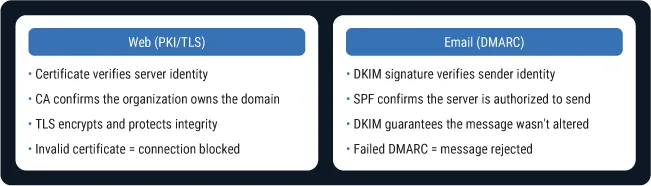
DMARC is the enforcement mechanism that makes email authentication meaningful. Without it, SPF and DKIM provide data but no action. With DMARC at enforcement, unauthorized senders are blocked at the source.
This is Zero Trust for email. Verify the sender. Enforce the policy. Don't trust messages that fail authentication.
How to layer security across channels
Zero Trust isn't a single layer. It's a stack of verification and enforcement applied across every channel.
For web traffic, that stack includes:
- PKI to verify server identity
- TLS to encrypt connections
- Certificate transparency to detect mis-issuance
- Browser policies to enforce standards
For email, the equivalent stack includes:
- SPF to authorize sending servers
- DKIM to sign and verify messages
- DMARC to enforce policy and provide visibility
- BIMI to display verified brand logos in the inbox
Neither stack replaces the other. An organization with perfect TLS implementation is still vulnerable if email authentication is missing. An organization with DMARC at enforcement is still exposed if web traffic isn't encrypted.
Zero Trust requires both.
The protocols differ depending on the channel, but the outcome is the same. Every interaction is authenticated. Every failure is handled according to policy. Implicit trust is eliminated.
This layered approach also creates defense in depth. If one layer fails, others provide protection. If an attacker compromises a sending server, DKIM signatures won't validate. If someone forges the "From" address, SPF will fail. If both are bypassed somehow, DMARC reports surface the anomaly.
Ultimately, this helps with building overlapping layers that collectively reduce risk.
Why this matters for your security posture
Adopting Zero Trust across both web and email has practical implications for compliance, deliverability, and risk management:
- Compliance and regulatory requirements: Industries with strict data protection requirements expect email authentication as part of security controls. Demonstrating DMARC enforcement shows auditors and regulators that you're actively preventing impersonation.
- Mailbox provider mandates: Google, Yahoo, and Microsoft now require bulk senders to implement SPF, DKIM, and DMARC. Organizations that don't comply face deliverability problems. Legitimate emails end up in spam or get blocked entirely.
- Reduced attack surface: When DMARC is at enforcement, attackers can’t impersonate your domain in emails to your customers, partners, or employees. The attack surface shrinks because one of the most common vectors is closed off.
- Brand protection: Impersonation damages trust. When customers receive phishing emails that appear to come from your domain, your reputation suffers even though you weren't the sender. DMARC enforcement prevents this. BIMI takes it further by displaying your verified logo in the inbox.
- Unified security strategy: Organizations that treat web and email security as separate silos create gaps. A unified Zero Trust approach creates consistent verification across all communication channels.
How to audit your Zero Trust readiness
Zero Trust is a journey, not a destination. It's a continuous process of verification, enforcement, and improvement. Here's how to check where you stand across both web and email.
1. Check your TLS and certificate posture.
- Are all your public-facing sites using valid TLS certificates?
- Are certificates issued by trusted CAs and properly configured?
- Are you monitoring for certificate expiration and mis-issuance?
- Have you implemented certificate transparency logging?
2. Audit your email authentication.
- Do all your domains have SPF records published?
- Is DKIM configured for every service that sends email on your behalf?
- Have you published DMARC records for all domains, including parked and legacy domains?
- What's your current DMARC policy: none, quarantine, or reject?
3. Identify gaps.
- Are there domains without DMARC records?
- Are there sending services not covered by SPF or DKIM?
- Is your DMARC policy still at p=none, providing visibility but no protection?
- Are you reviewing DMARC aggregate reports to understand your email ecosystem?
4. Move toward enforcement.
- Authorize all legitimate senders in SPF and DKIM.
- Gradually shift DMARC policy from none to quarantine to reject.
- Monitor reports for authentication failures and unauthorized senders.
- Treat email authentication as an ongoing program, not a one-time project.
The goal is parity. The same verification standards you apply to web traffic should extend to email.
If you wouldn't accept an unverified connection to your website, you shouldn't accept an unverified sender in your inbox.
Extend Zero Trust to every channel
Zero Trust applies wherever digital communication happens.
PKI and TLS have made verified identity the default for web traffic. Certificates, encryption, and browser enforcement work together to ensure that connections can be trusted.
DMARC, SPF, and DKIM bring the same model to email. Authorized senders, cryptographic signatures, and policy enforcement ensure that messages can be trusted.
Together, they form the foundation of a Zero Trust architecture that spans channels.
Organizations that embrace this approach close the gaps that attackers exploit. They protect customers from impersonation, meet compliance and deliverability requirements, and build security that works across every communication channel.
Not sure where your email authentication stands? Check your domain now to see your DMARC, SPF, and BIMI status instantly.
Featured Stories
DigiCert’s 2029 post-quantum infrastructure migration plan
.png)
Certificate lifecycle management reaches an inflection point
Subscribe to the blog
-

DigiCert is a global leader in intelligent trust, securing people, data, and devices with AI-powered solutions built to stop threats today and prepare for a quantum-safe future.
-



-
© 2026 DigiCert, Inc. All rights reserved.
Legal Repository Audits & Certifications Terms of Use Privacy Center Accessibility Cookie Settings