Why Brand Protection Starts with Verified Email
(BIMI & DMARC)
Your brand lives in more places than you think.
It's on your website, verified by certificates. It's on social media, protected by platform policies. It's in advertising, governed by trademark law.
But have you ever thought about it in the inbox?
Email is where customers interact with your brand most frequently. Receipts, confirmations, newsletters, support responses. Billions of messages, sent daily, carrying your name and reputation.
Yet, most organizations don't protect email the way they protect other brand touchpoints. There's no padlock icon. No visual indicator of authenticity. No easy way for customers to distinguish a legitimate message from a fraudulent one.
Attackers know this. That’s why they use email to impersonate brands, sending phishing emails that look identical to the real thing. And when customers fall for it, your brand takes the hit.
Brand protection doesn't stop at your website. It extends to every channel where your name appears. That includes the inbox.
Below, we’ll walk through how DMARC and BIMI work together to protect your brand in email, block impersonation at the source, and build customer trust with every message you send.
Your brand lives in the inbox
Think about how often customers interact with your brand through email:
- Order confirmations
- Shipping notifications
- Password resets
- Marketing campaigns
- Account alerts
- Support tickets
- Invoices
For many businesses, email is the most frequent touchpoint in the customer relationship. It’s more than social media, more than your website, and more than advertising. But unlike those other channels, email has no built-in way to verify authenticity.
When a customer visits your website, their browser checks the certificate. A padlock icon confirms the connection is secure and the site is legitimate. If something's wrong, they get a warning.
When a customer receives an email, nothing similar happens. The message arrives. It displays your name and logo, and the customer decides whether to trust it based on how it looks.
That's the gap attackers exploit.
A well-crafted phishing email is nearly indistinguishable from the real thing. Same logo. Same formatting. Same tone. The only difference is the sender, and most customers have no way to verify that.
Your brand is on the line every time a fraudulent email lands in a customer's inbox. Even if you didn't send it, your reputation is attached to it.
The cost of email impersonation
Email impersonation isn't just a security problem. It's a brand problem.
When attackers send phishing emails using your domain, customers don't blame the attacker. They blame you. The trust you've built erodes with every fraudulent message.
The FBI's Internet Crime Report documented over $2.7 billion in losses from business email compromise in 2024 alone. Phishing remains the most common initial attack vector for data breaches.
But those numbers don't capture the full cost. Consider what happens after a successful attack:
- Customers lose confidence in your communications
- Support teams field complaints and confusion
- Legal and compliance teams manage the fallout
- Marketing teams struggle to rebuild trust
- Future emails get ignored or flagged as suspicious
One phishing campaign can undo years of brand building.
And the attacks keep coming. Impersonation is easy because email wasn't designed with authentication. Anyone can send a message claiming to be anyone else. The "From" field is just text.
Organizations that don't address this gap are leaving their brand exposed to an active, never-sleeping, ongoing threat.
How DMARC protects your domain
DMARC (Domain-based Message Authentication, Reporting, and Conformance) is the foundation of brand protection in email. It verifies sender identity at the domain level, confirming that a message came from an authorized source. DMARC builds on two underlying protocols:
- SPF (Sender Policy Framework) specifies which servers are authorized to send email on behalf of your domain. You publish a list of approved IP addresses in DNS. When an email arrives, the receiving server checks whether the sending IP is on that list.
- DKIM (DomainKeys Identified Mail) adds a cryptographic signature to outgoing messages. Your server signs the email with a private key. The receiving server retrieves the public key from DNS and verifies that the signature is valid and the message wasn't altered.
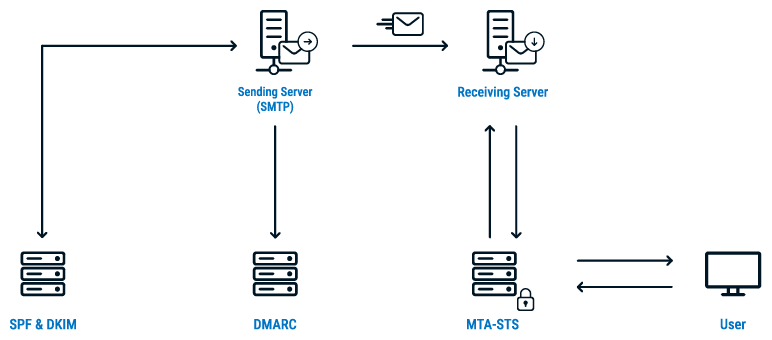
DMARC checks whether SPF or DKIM passed and whether the result aligns with the domain in the visible "From" address. If authentication fails, DMARC tells the receiving server what to do:
- p=none: Deliver the message, but send reports to the domain owner
- p=quarantine: Send the message to spam
- p=reject: Block the message entirely
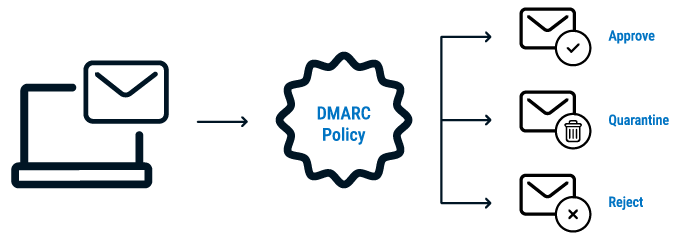
Ultimately, protection is all about enforcement. A domain with DMARC at p=none is monitoring, not protecting. Fraudulent emails still get delivered. Customers still receive phishing attempts with your name attached.
At p=quarantine or p=reject, unauthorized senders are blocked. Impersonation attempts fail. Your customers only receive emails you actually authorized.
This is proactive brand protection. You're not waiting for attacks to happen and then responding. You're preventing them at the source.
What is BIMI?
DMARC stops impersonation, but BIMI does more of the brand building in the inbox.
BIMI (Brand Indicators for Message Identification) displays your verified brand logo next to your emails in supported inboxes. It's a visual signal that the message is authentic, controlled by you, and safe to trust.
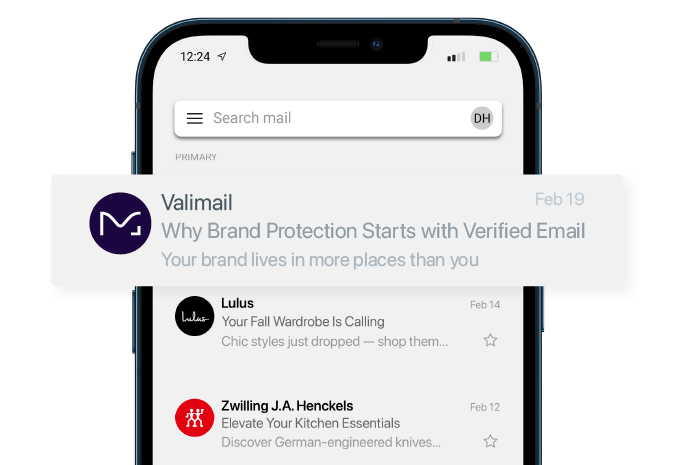
It’s the email equivalent of the verified checkmark on social media. Customers see your logo and know the message is real.
Here's how BIMI works:
- DMARC at enforcement. BIMI requires your domain to have a DMARC policy of quarantine or reject.
- Published BIMI record. You add a DNS record that points to your logo file (in SVG format) hosted at a specific URL.
- Verified Mark Certificate (VMC). To display your logo in most major inboxes, you need a VMC issued by a trusted Certificate Authority. The VMC confirms that you own the trademark and are authorized to use the logo.
When all three are in place, participating mailbox providers (including Gmail, Yahoo, and Apple Mail) show your logo next to authenticated emails. The result is immediate brand recognition. Your emails stand out. Customers know the messages are legitimate before they even open them.
Check your BIMI readiness for free
How BIMI builds brand trust
BIMI transforms email authentication from a defensive measure into a brand asset.
Without BIMI, email security is invisible to customers. SPF and DKIM operate at the protocol level. Customers don't know whether an email is authenticated or not.
With BIMI, authentication becomes visible. Your logo appears. Customers see it. Trust is reinforced with every message:
- Increased recognition. Your logo appears consistently across emails, building familiarity and recall. Customers associate the visual with your brand.
- Higher engagement. BIMI can increase email open rates by up to 20%. A recognizable logo draws attention in a crowded inbox.
- Visual differentiation. Impersonators can't display your logo. They can copy your name and formatting, but they can't replicate the verified mark. Customers learn to look for it.
- Competitive advantage. Most brands haven't implemented BIMI yet. Early adopters stand out. Their emails look more professional and trustworthy than competitors without verified logos.
- Customer education. Over time, customers learn that the logo means the email is safe. Emails without it become suspect. This creates a natural defense against phishing.
Plus, BIMI turns every email into a brand impression, and that’s without customers even opening the message.
The connection between VMCs and BIMI
BIMI requires proof that you own the logo you want to display. That's where Verified Mark Certificates come in.
A VMC is a digital certificate issued by a trusted Certificate Authority (like DigiCert) that confirms:
- You own the trademark for the logo
- You're authorized to use it in email
- The logo meets BIMI's technical requirements
The process involves trademark verification, similar to how extended validation certificates verify organization identity for websites. The CA confirms your trademark registration and issues a certificate that links your logo to your domain.
Most major mailbox providers won't display your logo without a VMC. Gmail, in particular, requires a VMC for BIMI logos to appear.
This creates a powerful intersection of capabilities:
- Valimail helps organizations achieve DMARC enforcement and implement BIMI records
- DigiCert issues the mark certificates that authenticate logo ownership
- Together, they enable verified brand presence in the inbox
The VMC isn't just a technical requirement. It's proof of authenticity. It confirms that the logo belongs to you, issued by a trusted third party, and verified against trademark records.
How to get your brand BIMI-ready
Here’s the step-by-step progression to get BIMI active for your brand:
- Reach DMARC enforcement
- Prepare your logo
- Trademark your logo
- Obtain a Verified Mark Certificate
- Publish your BIMI record
- Test and monitor
1. Reach DMARC enforcement.
BIMI requires a DMARC policy of quarantine or reject. If you're still at p=none, you need to move toward enforcement first.
This means:
- Auditing all domains you own
- Configuring SPF and DKIM for every authorized sender
- Reviewing DMARC reports to identify gaps
- Gradually shifting policy from none to quarantine to reject
Most organizations underestimate how many services send email on their behalf. Marketing platforms, CRMs, support tools, transactional systems. Each one needs to be authorized before you can safely enforce.
2. Prepare your logo.
BIMI has specific requirements for logo files:
- SVG Tiny PS format (a specific SVG profile)
- Square aspect ratio
- Centered design that displays well at small sizes
- No text or fine details that won't render clearly
Work with your design team to create a BIMI-compliant version of your logo. Test how it looks at various sizes and in different email clients.
3. Trademark your logo.
VMCs require a registered trademark. If your logo isn't trademarked, you'll need to complete that process first. This can take several months, so plan accordingly.
If you already have a trademark, confirm it's registered in a jurisdiction recognized by VMC issuers.
4. Obtain a Verified Mark Certificate.
Apply for a VMC or a CMC through a trusted Certificate Authority like DigiCert. The process involves:
- Submitting trademark documentation
- Verifying organization identity
- Providing your BIMI-compliant logo file
- Completing validation checks
Once issued, the VMC links your logo to your domain and enables display in supported inboxes.
5. Publish your BIMI record.
Add a DNS TXT record that points to your logo and VMC. The format looks like this:
default._bimi.yourdomain.com
The record includes URLs for your logo file and your VMC certificate.
6. Test and monitor.
Verify that your BIMI record is correctly published. Send test emails to supported mailbox providers and confirm your logo appears. Monitor for any authentication failures that could prevent logo display.
Protect your brand in every inbox
Brand protection should be proactive.
You don't wait for someone to counterfeit your products before protecting your trademark. You don't wait for a website breach before implementing certificates. And you shouldn't wait for phishing attacks before securing your email.
- DMARC stops impersonation at the source. Attackers can't successfully spoof your domain when enforcement is in place. Your customers only receive emails you actually authorized.
- BIMI builds recognition in the inbox. Your verified logo appears next to every authenticated message. Customers know it's you before they even open the email.
Together, they transform email from a vulnerability into a brand asset. Security and marketing are aligned. Protection and visibility combined.
The brands that implement DMARC and BIMI stand out. Their emails look more trustworthy. Their customers are better protected.
The brands that don't will keep fighting impersonation with no visible defense. Their customers won't know which emails to trust, and competitors will look more legitimate by comparison.
Check your BIMI readiness with our domain checker to see where you stand on DMARC, SPF, and BIMI. Then explore Verified Mark Certificates from DigiCert to complete the picture.
Your logo belongs in the inbox. Make sure it's verified.
Featured Stories

DigiCert’s 2029 post-quantum infrastructure migration plan
.png)
Certificate lifecycle management reaches an inflection point
Subscribe to the blog
-

DigiCert is a global leader in intelligent trust, securing people, data, and devices with AI-powered solutions built to stop threats today and prepare for a quantum-safe future.
-



-
© 2026 DigiCert, Inc. All rights reserved.
Legal Repository Audits & Certifications Terms of Use Privacy Center Accessibility Cookie Settings