Certificate Management
06-19-2026
Dean Coclin
What’s a certificate authority? A beginner’s guide to CAs
A certificate authority (CA) is a trusted organization that verifies identities and issues digital certificates to secure websites, software, email, and connected devices.
If you've ever noticed HTTPS or a padlock icon in your browser, you've already seen the result of a certificate authority's work. Before a website can establish a trusted encrypted connection, it needs a TLS/SSL certificate issued by a trusted CA.
In short, certificate authorities are what make trust possible on today’s internet. They help answer one of cybersecurity's most fundamental questions: Can you really trust who—or what—you're connecting to?
Why do we need certificate authorities?
The internet relies on encryption to protect sensitive information from cyber threats. But encryption alone isn't enough. Users also need a reliable way to verify the identity of the websites, applications, and organizations they interact with online.
That's what a CA is for.
By validating identities and issuing trusted certificates, CAs help establish secure connections between browsers, web servers, applications, and devices. It's how sensitive information like passwords, payment details, and personal data stays protected while in transit.
Without certificate authorities, it would be far riskier to shop and bank online, access healthcare portals, and use many of the digital services millions of people rely on every day.
It's important to note, however, that a certificate alone doesn't automatically make a website trustworthy. Cybercriminals can obtain domain validated (DV) certificates for malicious websites. That's one reason organizations that handle sensitive transactions often choose organization validated (OV) or extended validation (EV) certificates, which require additional verification.
How CAs help secure the internet
If you've ever seen a browser warning that a website is "Not Secure," it usually means the site doesn't have a valid TLS/SSL certificate or its certificate has expired. Any website that wants to display HTTPS and the padlock icon must first obtain a trusted certificate from a publicly trusted certificate authority.
Before issuing a certificate, a CA performs checks to ensure the requester has the right to receive it. Those checks help establish trust in the certificate and the identity or resource it represents.
Types of TLS certificates
TLS certificates can be categorized in two different ways: by the level of validation they provide and by what they’re designed to secure:
Validation levels describe how thoroughly a CA verifies the certificate holder’s identity before issuing a certificate.
Deployment types describe how many domains or subdomains the certificate protects.
TLS certificate validation levels
The level of validation a certificate authority performs depends on the type of certificate being requested.
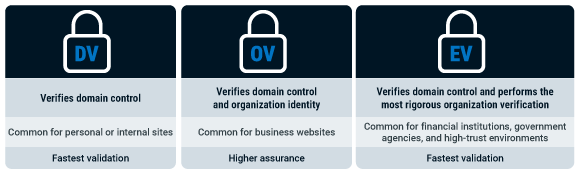
As validation requirements increase from DV to OV to EV, so does the level of identity assurance provided. While all three certificate types enable encryption, they differ in the amount of information verified before issuance.
TLS certificate deployment types
TLS certificates can also be categorized by the scope of coverage they provide:
Single-domain certificates secure one website domain.
Wildcard certificates secure a domain and its subdomains.
Multi-domain (SAN) certificates secure multiple domains with a single certificate.
Other digital certificates issued by CAs
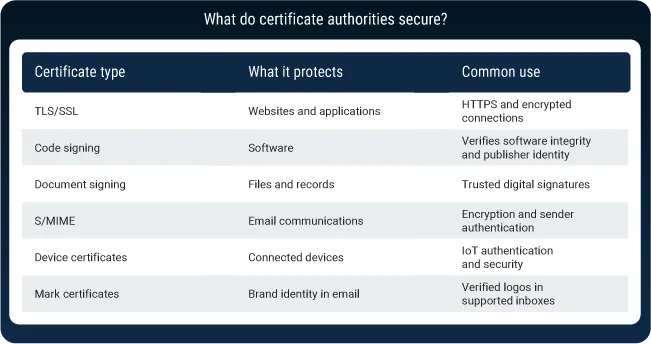
TLS/SSL certificates are the most widely recognized type of digital certificate. But they're far from the only certificates that CAs issue.
Today, certificate authorities help establish trust across websites, software, email, documents, and connected devices. The examples below illustrate some of the most common types of digital certificates used to secure modern digital interactions.
How to get a certificate from a CA
The first step to get a certificate from a CA is generating a Certificate Signing Request (CSR). A CSR contains information about the website domain, organization, or system requesting the certificate. You’ll submit the CSR to the issuing CA as part of the application process.
From there, the certificate authority performs the validation checks required for the type of certificate you're requesting. A DV certificate requires proof of domain control, while OV and EV certificates require additional identity verification.
Once validation is complete, the CA issues the certificate, which can then be installed on the appropriate web server, application, device, or service.
For CAs, trust isn't automatic—or permanent
Trust is the foundation of a certificate authority's role. But it's not granted forever.
To become a trusted certificate authority, a CA must meet strict industry requirements, undergo regular independent audits, and maintain compliance with standards established by organizations like the CA/Browser Forum. Browser vendors and operating system providers also maintain trust stores that determine which certificate authorities are recognized by users' devices.
If a CA fails to meet those requirements or experiences significant security or operational issues, browsers and operating systems may distrust its certificates.
One example: In 2024, Google, Mozilla, and Apple announced plans to distrust certificates issued from Entrust roots because of ongoing compliance and security concerns. Entrust customers that relied on affected certificates were forced to migrate to another trusted certificate authority to avoid browser warnings and potential disruptions.
The incident served as a reminder that trust must be continuously earned and maintained. That's why it's crucial to carefully evaluate a CA's reputation, security practices, audit history, and long-term reliability—not just its pricing or certificate offerings.
DigiCert: More than a CA
DigiCert is one of the world's leading certificate authorities. But for many organizations, obtaining a certificate is just the start.
Today, certificates are deployed across websites, applications, cloud environments, APIs, software supply chains, machine identities, and connected devices. Keeping them visible, up to date, and properly deployed has become a major operational challenge.
As certificate lifecycles continue to shorten, security teams face growing pressure to track expiration dates, automate renewals, and reduce the risk of disruptions caused by expired certificates. That's why many teams are investing in certificate lifecycle management (CLM). CLM solutions like DigiCert Trust Lifecycle Manager help you stop outages and stay compliant by automating certificate management across your entire environment.

Featured Stories

PQC (Post-Quantum Cryptography)05-28-2026
DigiCert’s 2029 post-quantum infrastructure migration plan
.png)
Certificate Lifecycle Management04-24-2026
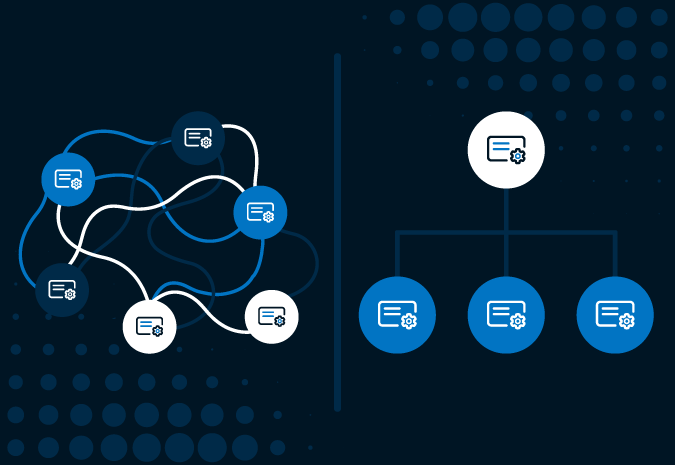
Certificate lifecycle management reaches an inflection point
Subscribe to the blog
-

DigiCert is a global leader in intelligent trust, securing people, data, and devices with AI-powered solutions built to stop threats today and prepare for a quantum-safe future.
-



-
© 2026 DigiCert, Inc. All rights reserved.
Legal Repository Audits & Certifications Terms of Use Privacy Center Accessibility Cookie Settings